Interactions Correctly?


AEM's RUM is Generally Available Now. Drink Up.


Implement Structured Framework for AEM Cloud Migration
Introduction
AEM Cloud Service Release Notes 2024.5.0 introduces some features and upgrades that significantly impact the way you use the platform.
One such improvement is the General Availability (GA) of the Realtime Use Monitoring Service (RUM). This update is available to all Adobe AEM users without you having to take any additional steps to integrate it.
While the Realtime User Monitoring service provides multiple insights for improving the user experience of digital properties, we read the fine print to highlight the preconditions and limitations that we think will dilute their efficacy.
Some features
'Use' over 'User'
AEM's Realtime Use Monitoring Service (RUMS) captures, analyzes, and measures to understand the nature of user engagement with AEM Sites in real-time.
RUMS is not a personalization service, since it ignores the user and only seeks to optimize user engagement.
The service offers insights on page performance, including metrics on number of clicks, page views, Core Web Vitals (CWV), conversions, and customer journey maps.
User Data Privacy
Realtime Use Monitoring Service does not collect any PII data or client-side state or ID, such as cookies or localStorage, sessionStorage or similar, to collect usage metrics. There is no "fingerprinting" of devices or individuals via their IP address, User Agent string, or any other data when capturing sampled data.
The visitor is confident that his data remains private on AEM-powered websites. The website operator does not need to create consent or opt-in mechanisms.
What data does the RUM Service collect?
Data that Realtime Use Monitoring Service collects includes:
- Host name and URL of the website built on AEM Sites, excluding URL parameter details.
- Date and time of visit
- The user browser type and OS used to display the page
- Refferer Link, if the user followed a link to the page being visited
- The Referrer URL (the URL of the page that linked to the current page, if the user followed a link)
- A randomly generated ID of the page view, in a format similar to: 2Ac6
- Checkpoint or name of the event the visitor interacts with in the sequence of loading the page.
- The source, or identifier, of the DOM element, such as an image the user engages with, for specified checkpoints.
- The target, or link to an external page or resource the user interacts with, for specified checkpoints.
- The Core Web Vitals (CWV) performance metrics, including the Largest Contentful Paint (LCP), First Input Delay (FID), Cumulative Layout Shift (CLS), and the all-important Time To First Byte (TTFB), to describe the visitor's quality of experience.
However, do also consider:
Version
Realtime Use Monitoring Service Client-side monitoring only works for customers with AEM Cloud Service version 2024.5.16461 and above.
Sampling Data
One aspect of maintaining user privacy is to minimize data collection. But does this have unintended consequences?
Realtime Use Monitoring Service's default selection is to sample 1 visitor data for every 100. Though this sampling rate can be increased or decreased, we suspect it will not match the traditional data collection method of collating data on every interaction.
Given the adage that more data leads to better inferences, the RUMS fractional data sampling rate is limiting, especially when existing web traffic is low, and enterprises are running campaigns to drive traffic.
First Contentful Paint (FCP)
Realtime Use Monitoring Service does not track it. Yet.
First Contentful Paint (FCP) is a web performance metric that measures how long it takes for a web page to render the very first bit of its actual content - text, images, or even elements like SVGs -on the user's screen. FCP helps gauge how quickly users can start to interact with your website and provides valuable website performance optimization insights.
FCP impacts all other metrics of gauging user experience, as well as Google search ranking. By not tracking it, web analytics has no way to gauge how much FCP influences the data on clicks, page views, time spent on page, effect of referring URL, etc.
Blocking Trackers
In all, 11 million websites use AEM. But only 18% of these are active. It's reasonable to assume that enterprises would not use AEM to create their websites and keep them inactive. Considering 126 Fortune500 companies use AEM to power their websites.
The catch is Realtime Use Monitoring Service works on AEM powered websites, but not if the user has activity tracker blockers installed.
Consider this –
| Total number of websites in the digital universe in 2024 | 1.1 billion |
|---|---|
| Only 18% of them are active | 1.98 million |
| Polled sample of US users with ad and activity tracker blockers in 2024 (browser + mobile) | ~ 40% |
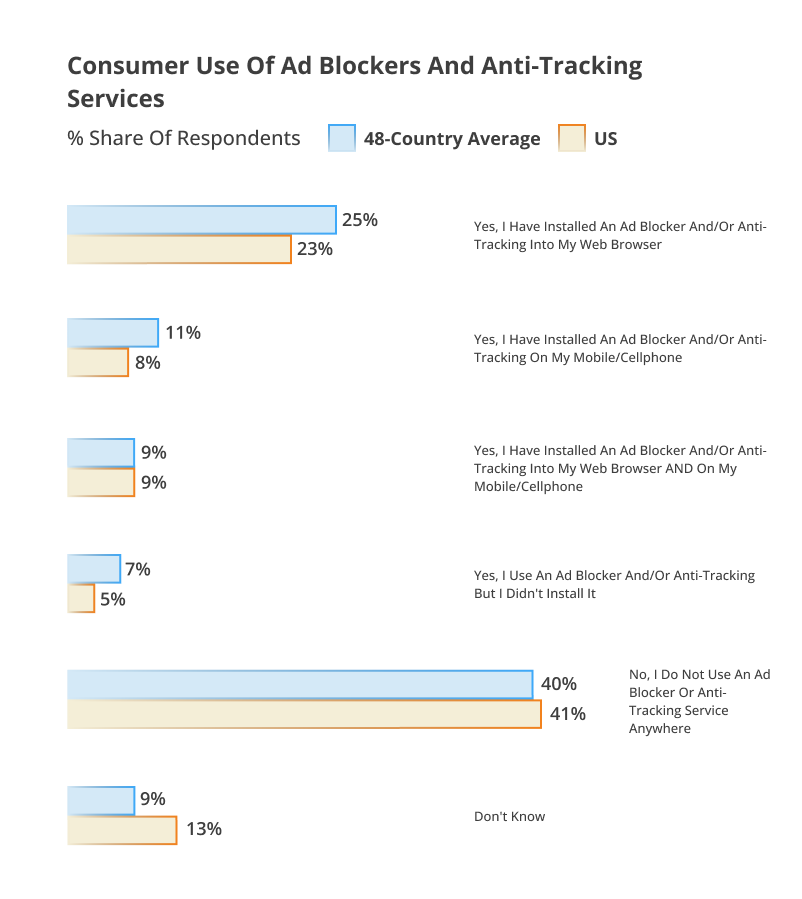
While it may be a stretch to directly impute that 40% of AEM website visitors are invisible to the Realtime Use Monitoring Service, it's a thought. The increasing trends among users to protect their data and online activity severely impede data collection by the Realtime Use Monitoring Service. When usage statistics of page views and user interactions are under reported, the insights are also faulty.
Final Thoughts
Adobe Experience Manager (AEM) uses Real Use Monitoring (RUM) to help understand how visitors interact with your AEM sites.
AEM Realtime Use Monitoring Service in enterprise businesses irons out performance issues and improves the end-user experience. Typical use-cases are to-
- Identify and fix performance bottlenecks for customer sites.
- Streamline automated traffic lookup for clicks and page views.
- Understand and improve the interaction and compatibility between AEM and other scripts, such as analytics, targeting, or external libraries, on the same page.
- Measure efficacy of experiments
There are constraints to using the Realtime Use Monitoring Service, but it is possible to work around them using an overall digital impact perspective and optimize user experiences across all digital properties and devices.
Ask us how. As Preferred Partners for 16+ years, Xerago is implementing Adobe modules. From before, they were integrated into the Adobe Experience Cloud.
Ram Prabhakar
Head of Solutions and Content
Xtelligence Inbox.
Your weekly dose of marketing smarts!
Related Posts