Interactions Correctly?


Why Is My GA4 Traffic Wrong? Hidden Tracking Problems and How to Fix Them


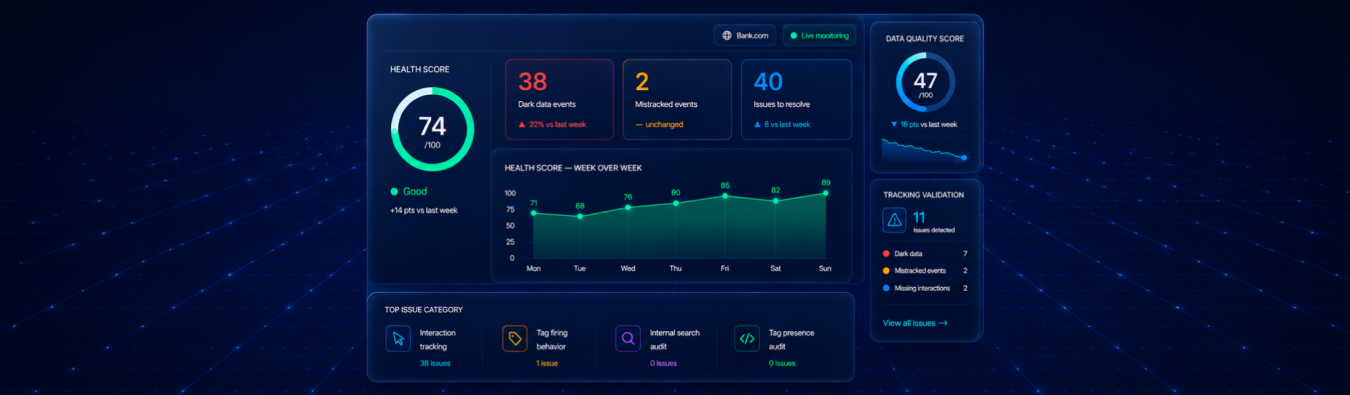
Fix GA4 Tracking Issues with Xerago Truemeasure
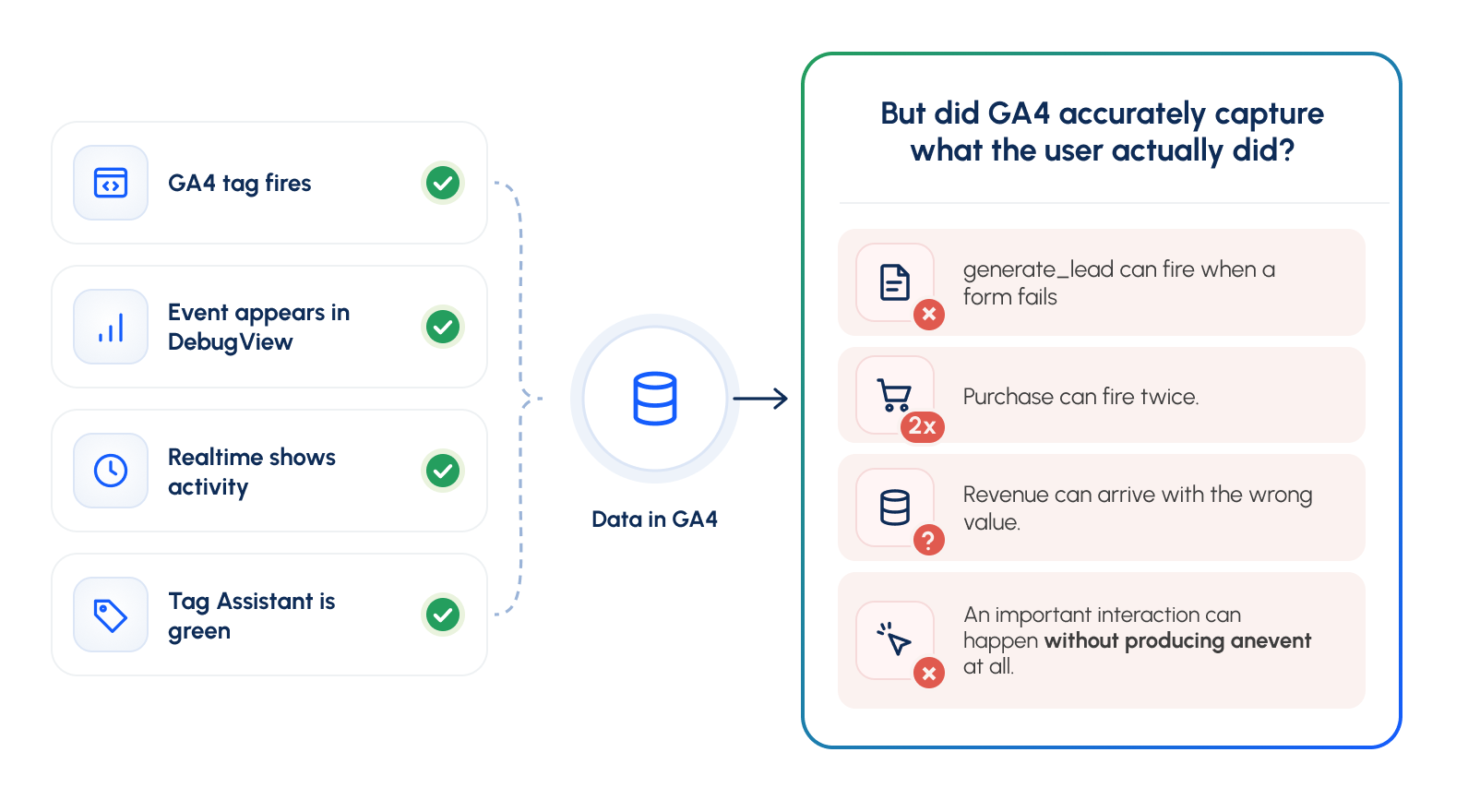
Your GA4 tag fires. The event appears in DebugView. Realtime shows activity. Tag Assistant is green. But none of those checks answers the most important question:
Did GA4 accurately capture what the user actually did?
A generate_lead event can fire when a form fails. A purchase event can fire twice. Revenue can arrive with the wrong value. And an important interaction can happen without producing an event at all.
In every case, GA4 can be technically receiving data. The measurement can still be wrong.
To check whether GA4 is tracking correctly, validate three things:
- Presence: Did the expected event fire?
- Accuracy: Did it capture the correct action, values, timing, and frequency?
- Completeness: Did you capture every interaction required to understand the journey and make the intended business decision?
Tools such as Tag Assistant and DebugView are excellent for investigating individual tags and events.
The harder question is:
How do you continuously find what is wrong, what is missing, and what you don't even know you should be measuring?
That is the measurement problem Xerago TrueMeasure is designed to address.
TrueMeasure works alongside your existing analytics stack to identify measurement gaps across digital journeys, not just whether tags fire, but whether the resulting measurement reflects what users actually do.
The Three Levels of GA4 Validation
Checking whether GA4 works should not stop at seeing an event appear.
There are three different questions to answer, and each one tells you something different about the quality of your measurement.
1. Presence: Did GA4 Capture Anything?
Did the expected event fire and reach GA4? For example, imagine a visitor completes a contact form and clicks Submit.
You expect GA4 to record: generate_lead
You can use tools such as:
- Google Tag Assistant
- Google Tag Manager Preview
- GA4 DebugView
- GA4 Realtime
- Browser network requests
If generate_lead appears, you have a confirmed presence. The event exists and data was sent.
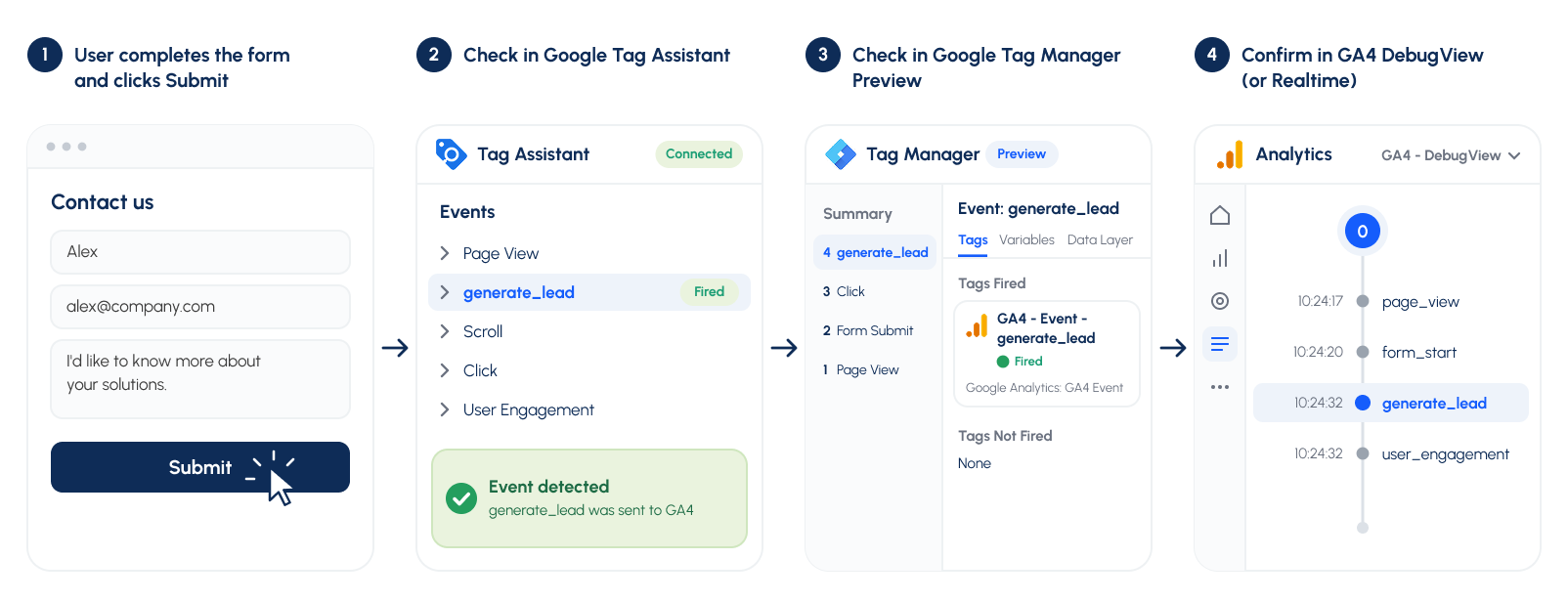
But this does not yet tell you whether the event should have been fired.
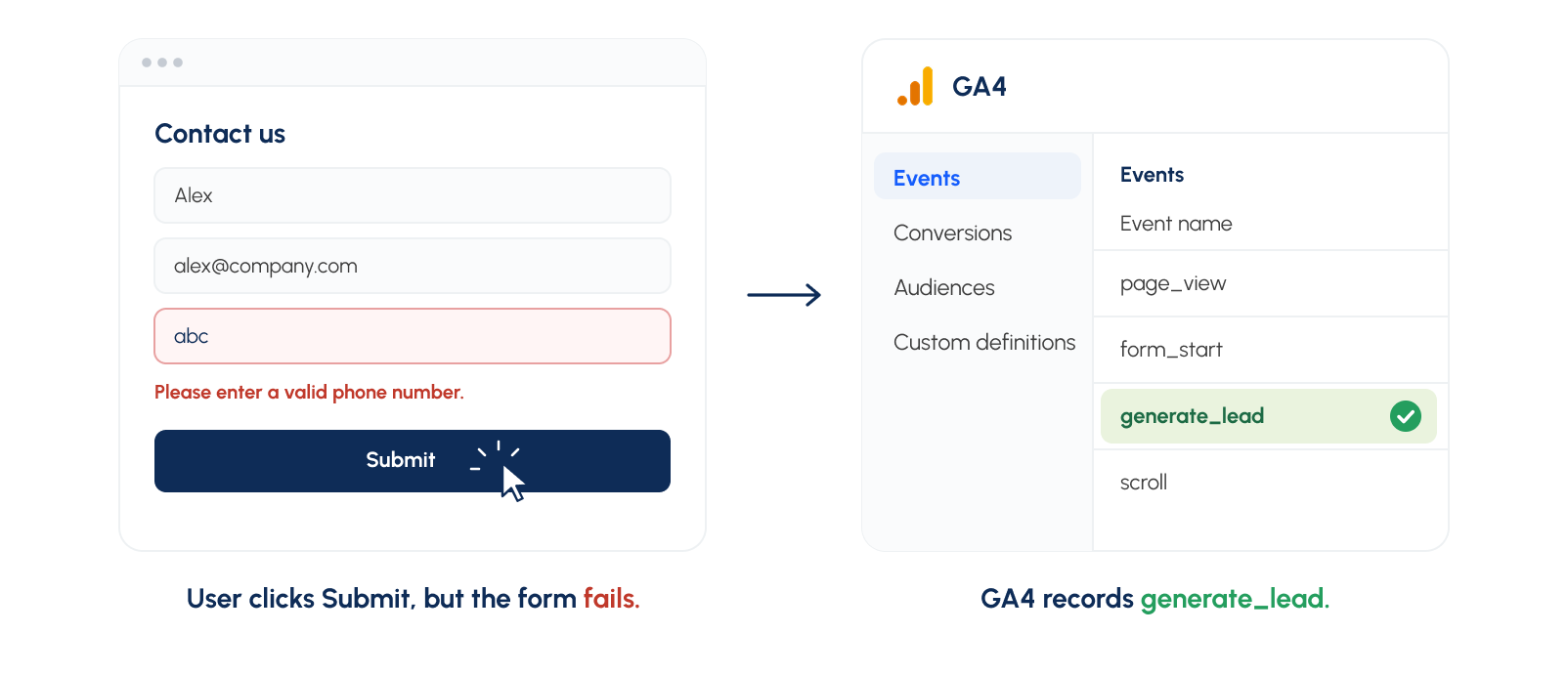
For example, the form might have returned an error after the user clicked Submit.
GA4 still received generate_lead. So, Presence confirms that tracking happened. It does not confirm that the tracking was correct.
2. Accuracy: Did GA4 Capture What Actually Happened?
The second level asks a more important question: Does the event accurately represent the user's real action?
Go back to the same form example.
A visitor:
- Enters their details.
- Clicks Submit.
- Receives an error.
- No lead is created.
But GA4 records: generate_lead
The tag fired. The event reached GA4. So the implementation passed the Presence test. But it failed the Accuracy test because GA4 reported a lead that did not actually exist.
Accuracy means checking whether:
- The correct event fired.
- It fired because the intended action actually occurred.
- It fired at the right moment.
- It fired the correct number of times.
- Its parameters contain the correct values.
- Events occurred in the expected sequence.
A successful lead journey might look like:
User submits form successfully → backend confirms submission → generate_lead fires once
That is an accurate measurement. A failed form journey should not produce the same conversion event.
So, Accuracy confirms that GA4 is telling the right story about what happened.
3. Completeness: Did GA4 Capture Everything That Matters?
Even accurate events do not guarantee complete measurement. The third level asks:
Are all the important interactions across the customer journey being measured?
This requires starting with the actual user journey rather than starting with the events already visible in GA4.
Imagine the real journey is:
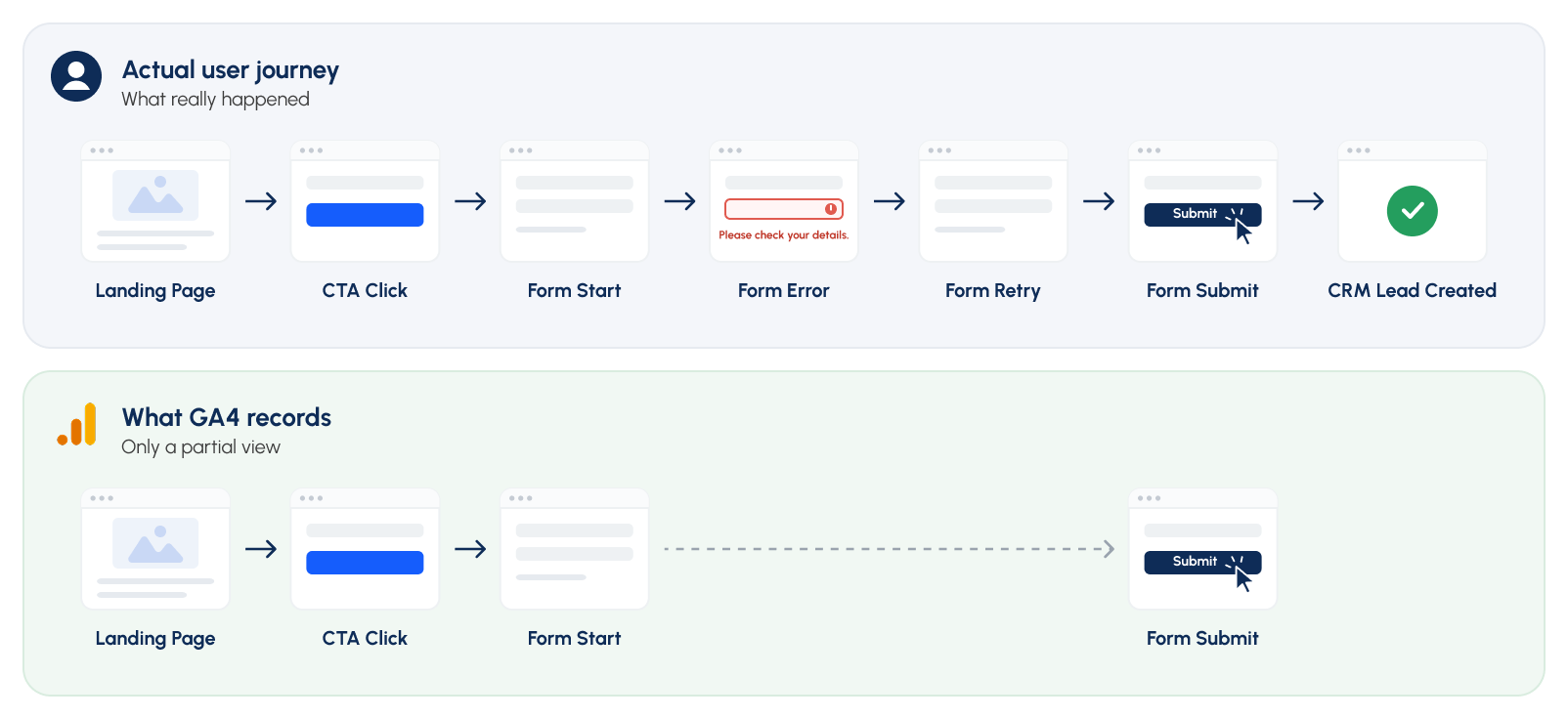
Every event that exists in GA4 could be firing correctly. Nothing may appear broken in Tag Assistant. DebugView may show exactly what the implementation was configured to send. But several important interactions are invisible: Form Error, Form Retry, CRM Lead Created
That creates a different type of problem. You cannot troubleshoot form_error in DebugView if nobody implemented a form_error event in the first place. This is why completeness requires comparing:
What users actually do against: What your analytics implementation captures
For example:
| Actual customer action | What GA4 Recorded | Measurement reality |
|---|---|---|
| Landing page viewed | page_view | Captured |
| CTA clicked | cta_click | Captured |
| Form started | form_start | Captured |
| Form error occurred | Nothing | Missing |
| User retried the form | Nothing | Missing |
| Form submitted | form_submit | Captured |
| CRM created a valid lead | Not checked | Outcome unknown |
The implementation may therefore be technically healthy while the measurement remains incomplete. So, Completeness confirms that you are measuring the parts of the journey that matter for understanding performance and making decisions.
Presence vs Accuracy vs Completeness: A Quick Glance
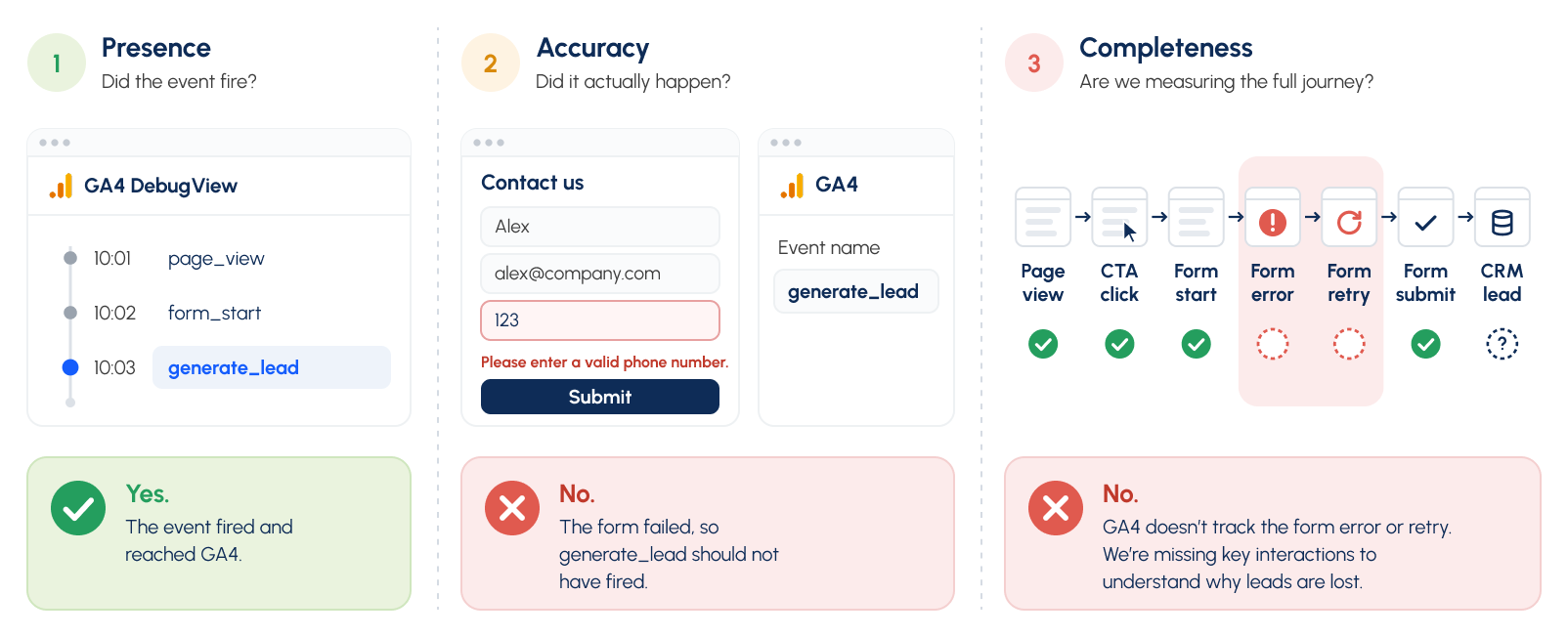
Tag Assistant can help answer: Did my tag fire? DebugView can help answer: Did GA4 receive my event and parameters?
Those tools are extremely useful for validating individual events. But measurement teams also need to answer broader questions:
- Did we measure the interaction correctly?
- What important interactions aren't being measured at all?
- What are we already collecting but not using?
That is where Xerago TrueMeasure extends the validation process.
The Hardest GA4 Problems May Not Look Like Tracking Problems
When a tag fails completely, the problem is usually visible. An expected event does not appear in Tag Assistant, DebugView, or GA4. But some of the more consequential measurement problems can be much harder to spot.
- An event may be firing successfully but representing the wrong action.
- An event may contain the wrong revenue, product, form, or campaign value.
- An important customer interaction may never have been instrumented.
- Or useful data may already be collected without being connected to reporting or decision-making.
In these situations, there may be no obvious red error message. The analytics implementation can continue producing reports while the underlying measurement does not fully represent customer behavior.
That is why GA4 validation needs to extend beyond:
Tag → Event → GA4
and examine the wider relationship:
Business Intent → User Interaction → Event → Analytics → Business Outcome
This broader measurement layer is where TrueMeasure is designed to operate.
GA4 Can Only Show You What You Chose to Track
Suppose GA4 contains 150 events. You can audit those 150 events.
But what if the customer journey actually contains important interactions that were never instrumented?
Those interactions will not appear in DebugView, Realtime, standard reports, or an event audit because GA4 never received them in the first place.
For example:
| Actual customer interaction | GA4 | Measurement status |
|---|---|---|
| CTA click | Captured | ✓ |
| Form start | Captured | ✓ |
| Form error | Missing | Dark Data |
| Form retry | Missing | Dark Data |
| Form submit | Captured | ✓ |
| Lead generated | Captured on button click | Mistracked |
| CRM lead created | Not reconciled | Validation gap |
This is why looking only inside GA4 can create false confidence. GA4 can tell you what happened to the events it received, but it cannot show an interaction that was never included in the measurement design.
Finding those gaps requires comparing the real customer journey with the analytics implementation. That is where measurement assurance extends beyond conventional tag debugging.
When Does Manual GA4 Testing Become Difficult to Scale?
Manual GA4 testing is an important part of implementation QA and remains useful for investigating individual events, pages, and journeys.
For example, an analyst can complete a form, watch the event in Tag Assistant or DebugView, inspect its parameters, and confirm whether the expected information reached GA4. For a relatively small website with a limited number of events and infrequent implementation changes, this process can provide effective coverage.
The challenge is maintaining the same level of validation as the measurement environment becomes larger and changes more frequently.
Consider an organization that operates several websites across multiple markets. Each site may contain different forms, product journeys, logged-in experiences, consent states, campaign pages, and analytics events. A single customer journey may also need to be tested across mobile and desktop, accepted and rejected consent, different browsers, and multiple user states.
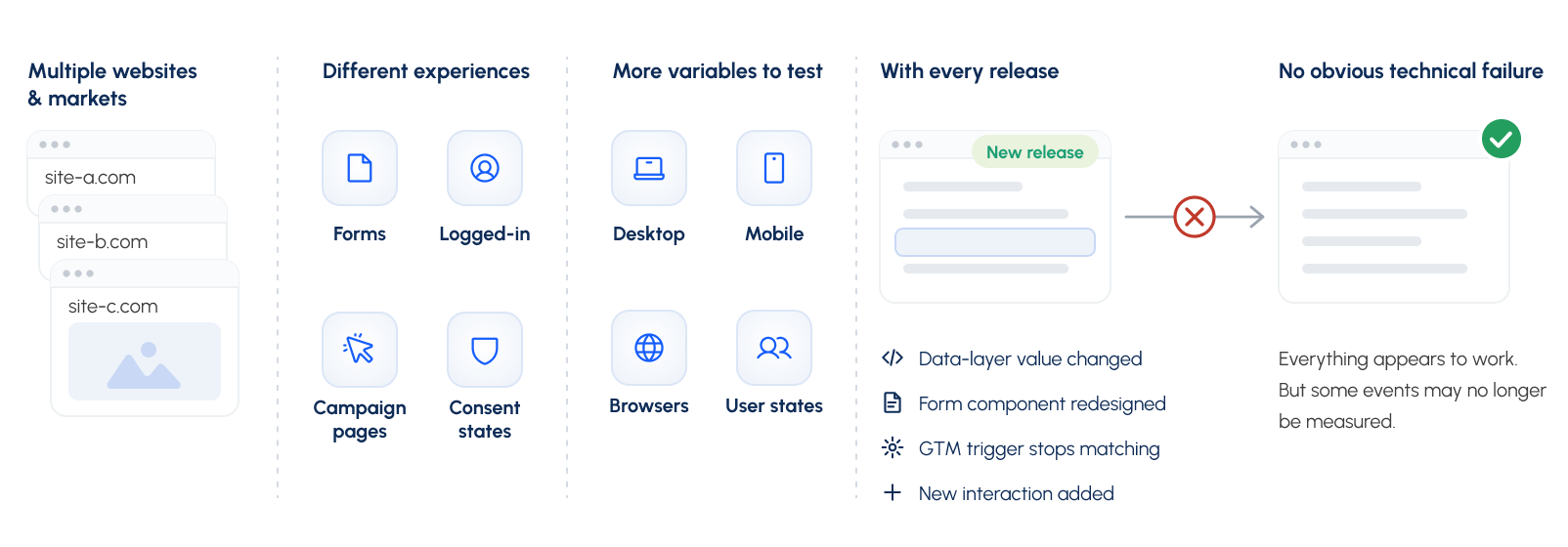
A release can then change part of that measurement without creating an obvious technical failure. A developer may change a data-layer value, a form component may be redesigned, a GTM trigger may stop matching, or a new interaction may be introduced without corresponding measurement.
The existing GA4 implementation may continue collecting data, which makes these changes harder to identify through routine reporting alone.
This creates two scaling problems.
First, the number of combinations that need validation increases. Testing one event once is very different from repeatedly validating hundreds of events across pages, journeys, devices, consent states, markets, and releases.
Second, manual testing usually starts with what the team already knows should be tracked. If a new or important customer interaction was never included in the tracking plan, there may be no event for the analyst to test in DebugView in the first place.
This does not mean manual GA4 testing should be replaced. It means manual testing becomes one part of a broader measurement-assurance process.
For larger or frequently changing implementations, teams need a way to repeatedly compare the intended customer journey with the measurement that actually exists and identify where interactions are mistracked, missing, or captured but unused.
How Do You Know If Your Organization Needs This?
Ask your analytics team these five questions:
- Do we know which important user interactions aren't currently tracked?
- Can we identify events that fire successfully but represent the wrong behavior?
- Do we know which collected events are never used in reporting or decisions?
- Can we explain material differences between analytics and backend business outcomes?
- Can we repeat these checks reliably after every significant release?
If some of those questions are difficult to answer, the problem may no longer be GA4 implementation alone.
It may be measurement assurance.
How Xerago TrueMeasure Adds Continuous Measurement Assurance
Analytics platforms like GA4 analyze the events they receive; they aren't built to independently judge whether an interaction was mislabeled or missing altogether. TrueMeasure sits alongside GA4 and the rest of the stack, scanning pages and interactions to identify mistracked, dark, and unutilized signals, scored against the business action each should represent. Findings come prioritized, and upon approval. TrueMeasure can deploy the corresponding fix directly to the tag manager and validate it post-deployment.
The goal isn't to replace the diagnostic thinking above. It's to apply it at a scale and frequency manual review can't match.

Frequently Asked Questions
How do I check if GA4 is tracking correctly?
Start with presence, confirm the tag fires on every required page and reaches the correct property. Then check accuracy by comparing what each event claims against what actually happened, and finally completeness, making sure every decision-relevant step is instrumented.
Does Tag Assistant prove GA4 is working?
No. It confirms a tag fired and which trigger caused it, not that the parameters are correct, that it fired once, or that it represents the right user action.
Why does a GTM tag fire but not appear in GA4?
Usual causes: a mismatched Measurement ID, the tag pointing at the wrong data stream, consent settings blocking the request, or an ad blocker intercepting the call before it reaches Google's servers.
How do I find duplicate events in GA4?
Compare event counts against a known backend number (like completed orders), check the network panel for repeated identical requests, and check GTM for multiple containers or triggers pointed at the same tag.
How often should GA4 tracking be audited?
At minimum after every release that touches tracked pages or forms, plus a full funnel review on a recurring schedule as quarterly is a reasonable default, more often for high-release-velocity teams.
Can GA4 detect missing events automatically?
No. GA4 only reports on data it receives, it can't know if an interaction happened if nothing was instrumented to capture it. Finding dark data means comparing the intended journey against what's actually tracked, not something GA4 surfaces on its own.
Kaviarasu S
Associate Content Writer
Xtelligence Inbox.
Your weekly dose of marketing smarts!
Related Posts
Xerago TrueMeasure
Google Tag Diagnostics Tool Doesn't Validate Measurement Health. Here's Why