Interactions Correctly?


AEM 6.5 Migration: The Content Operations Workstream Teams Overlook

AEM Content Migration & Go-Live Checklist
Adobe has set an end date for AEM 6.5 support, making the modernization decision relatively straightforward. But choosing a path is only the beginning.
The real challenge is the content migration: inventory, cleanup, content mapping, component mapping, redirects, and governance. Yet many organizations start planning this work only after the technical decision is made.
That delay is where migration timelines start to slip.
Content debt doesn’t pause while you finalize your platform strategy, it keeps growing. And the tasks that often look simple on paper, especially redirects and component mapping, can become some of the biggest sources of rework and delay.
Here’s how that delay compounds & how to build a content effort plan early enough to keep your AEM 6.5 migration on track.
What the AEM 6.5 Support Changes Mean for Your Business
Adobe identifies AEM 6.5.26 as the final regular AEM 6.5 service pack. Support timelines vary by deployment: Adobe Managed Services support ends August 31, 2026, while on-premises core support is planned to end in February 2027. Teams should confirm the timeline that applies to their environment with Adobe's current documentation.
Organizations generally have three paths:
- AEM 6.5 LTS: Extend the life of the existing platform with long-term support while deferring a cloud migration.
- AEM as a Cloud Service: Move to a cloud-native operating model, which may require changes to customizations, components, deployments, and architecture.
- Broader modernization: Use the support change as an opportunity to rethink content architecture, integrations, instances, and authoring processes.
Why Content Operations Matter in AEM Migration
AEM content operations is the workstream that determines whether a technically ready destination environment actually launches with usable content.
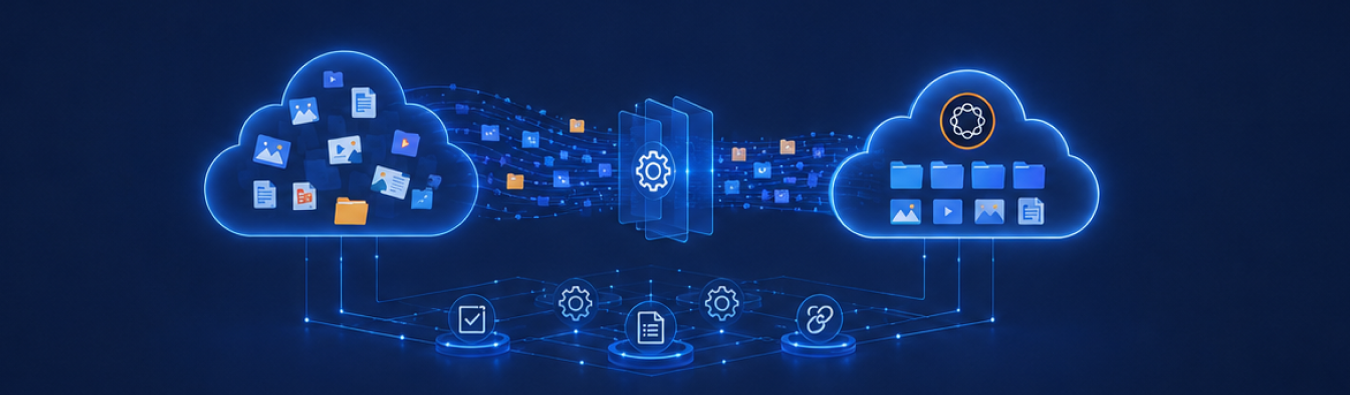
In simple terms, it is the process of preparing, moving, checking, and managing website content during an AEM migration. It covers everything from inventorying existing content and deciding what moves, to mapping content to new components, remediating assets, migrating and validating pages, preserving critical URLs, and establishing governance after go-live.
This is why content work can become the critical path even when the technical migration is on schedule. Infrastructure can be ready, environments can be tested, and components can be approved but content decisions still take time.
Teams need to determine what is redundant, what needs to be rebuilt, who owns each piece of content, and what requires manual remediation.
The five risks below are what happens when that work is treated as a downstream task instead of being planned as a core part of the migration.
The 5 risks of delaying content operations during AEM Migration
1. Content debt compounds while you wait
Duplicate pages, obsolete assets, and inconsistent metadata don't stay static; they accumulate with every campaign, every reorg, and every content owner who leaves without documenting what they owned.
The longer content operations are deferred, the larger the inventory and ROT (redundant, outdated, trivial) cleanup job gets, and the more of it has to happen under time pressure instead of on a planned schedule.
2. Redirect and discoverability risk widens
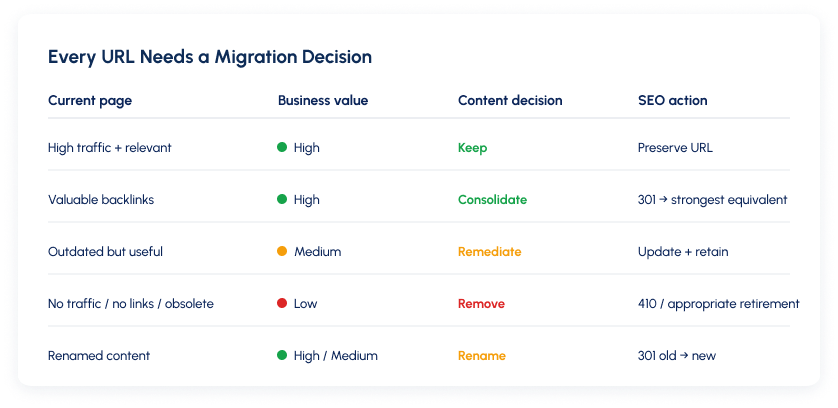
Every page that gets removed, consolidated, or renamed needs a tested redirect, or the organization loses the SEO value that page built up.
This risk now extends further than search. Adobe states that Edge Delivery Services websites are SEO optimized and GEO optimized for LLMs meaning discoverability inside AI assistants depends partly on the same structural content quality that redirect and metadata work protects. Content operations that get rushed at the end of a migration is where this kind of discoverability damage typically originates.
3. Component-rebuild scope grows undetected
Component and template mapping reveals which existing content structures have no direct equivalent in the destination environment and will require manual rebuilding or restructuring.
When this mapping is delayed, teams often discover the true volume of manual work late in the migration after timelines and resources have already been committed. What looked like a straightforward migration can quickly become a much larger content-rebuild exercise.
4. Launch QA gets compressed
Content QA is more than checking whether pages migrated successfully. It includes content completeness, layout, links, metadata, responsive behavior, accessibility, authoring, and publishing.
When content operations start late, QA is often the first activity to be squeezed to protect the launch date. That leaves less time to catch issues that may only become visible once real content is in the new environment.
5. Governance debt carries into the new platform
A migration can move content into a new AEM environment without fixing the processes around it. If ownership, permissions, approval workflows, publishing standards, and content lifecycle rules aren't defined before go-live, the new platform can quickly accumulate the same content problems as the old one.
Delaying governance doesn't remove the work. It simply shifts it into the post-launch period, when teams are already dealing with production issues, new requests, and business priorities.
Want to See Where Your Migration Stands on These Risks? Get the checklist to score your content cleanup, migration SEO, and go-live readiness before these risks compound.
How to plan content operations smoothly during an AEM migration
A content-operations workstream doesn't avoid these risks by accident. It needs clear ownership, decisions, sequencing, and checkpoints just like the technical migration. Six things make the difference:
1. Establish Clear Ownership for Content Decisions
One person or a small team needs clear accountability for content decisions throughout the migration. This owner should coordinate content inventory, ROT cleanup, content mapping, metadata requirements, redirect decisions, approvals, and migration QA.
They do not need to make every decision alone, but they must ensure that the right stakeholders are involved and that unresolved issues have a clear path to resolution.
The owner should also maintain the content migration backlog, track dependencies, document exceptions, and escalate decisions that could affect scope, timing, SEO, user experience, or launch readiness.
Without a named owner, ROT cleanup, component mapping, content prioritization, and exception handling tend to be decided inconsistently or not at all. That creates delays, duplicated effort, and last-minute surprises when business stakeholders discover that important content has been omitted, changed, or assigned to the wrong destination.
2. Define decision rights and approval deadlines.
ROT cleanup and component mapping stall when nobody has the authority to make the final call. Assign decision-makers for key content questions, including what should be retained, rewritten, consolidated, redirected, or retired.
Clarify which decisions belong to content owners, subject-matter experts, SEO, legal, UX, and the technical team, and identify who has final approval when stakeholders disagree. Set deadlines for decisions that can affect migration scope, sequencing, resourcing, or schedule.
A visible decision log can help track open questions, owners, due dates, and final outcomes so that unresolved issues do not remain hidden until late in the migration.
3. Prioritize by business value and complexity.
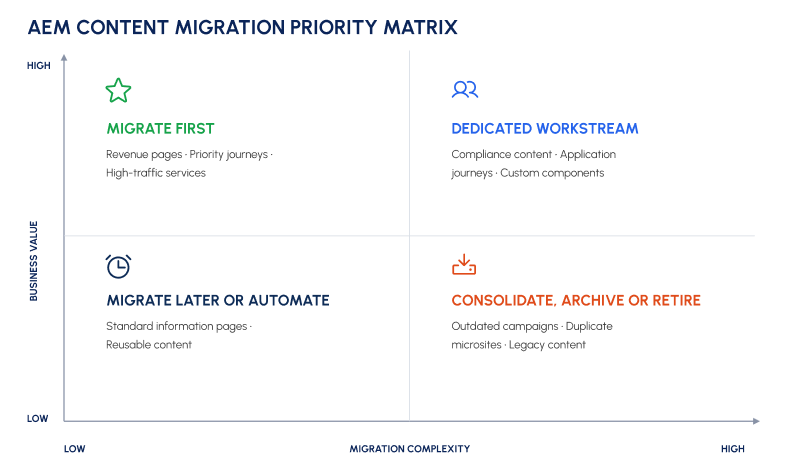
Start with high-traffic, high-value, or business-critical content, especially content that supports revenue, customer service, compliance, or key user journeys.
At the same time, consider the effort required to migrate each content group. A simple, high-value page may be an early candidate, while a complex but low-value content set may need to be deferred, consolidated, or retired.
Use a consistent prioritization framework that considers traffic, conversions, strategic importance, content quality, technical complexity, dependencies, and risk. Lower-value, lower-complexity content can follow once the migration process has been proven, while high-complexity items can receive focused planning rather than disrupting the entire program.
4. Run technical and content workstreams in parallel.
Content operations should not wait for the destination environment to be fully ready. Inventory, ROT assessment, ownership decisions, content modeling, component mapping, redirect planning, and content preparation can begin as soon as the platform direction and target architecture are clear.
The technical team can continue building templates, components, integrations, and migration tooling while the content team prepares source material and resolves business decisions. Regular coordination points are important so that changes to the target architecture are reflected in content plans and content findings can inform technical implementation before the build is complete.
5. Validate the Migration Process with a Pilot
Test the process across a representative set of page types, components, templates, assets, and content scenarios before applying it to the full estate. The pilot should include both straightforward examples and known edge cases, such as pages with complex layouts, embedded media, localization, legacy components, or unclear ownership.
Measure how long each activity takes, where manual intervention is required, and what defects appear during migration and QA. A pilot exposes mapping, migration, governance, and validation issues while there is still time to change the approach. Use the findings to refine the migration rules, update estimates, improve training, and confirm that the process can scale without creating unacceptable quality or schedule risks.
6. Isolate Exceptions Without Slowing the Main Migration
Some content will require special handling because of legal requirements, business dependencies, unusual technical structures, missing source data, localization needs, or unresolved ownership. Keep these exceptions visible in a separate track with a named owner, documented reason, required action, and target resolution date.
This prevents edge cases from slowing down the standard migration path while ensuring they are not forgotten. Review the exception list regularly and decide whether each item should be resolved, deferred, migrated manually, replaced, consolidated, or retired.
What content assessment should be planned before this migration?
Start with a content workload assessment before committing to a full migration execution plan. Run it as a short, evidence-based discovery phase with the following steps:
1. Create a complete content inventory
Export or crawl the relevant repositories, sites, assets, pages, components, templates, metadata, redirects, and publishing dependencies. Record attributes such as content type, location, owner, last modified date, traffic, search visibility, language, and relationships to other content. Reconcile the inventory against analytics, search data, and business-owner input so it reflects both what exists technically and what is actually used.
Want the full AEM Content Migration Get the checklist to assess whether your content cleanup, migration SEO, and go-live readiness are complete before you migrate.
2. Classify each item by disposition
Assign every item to a clear category: migrate as-is, migrate with remediation, rebuild manually, consolidate, archive, or delete. Use agreed criteria such as business value, legal or regulatory requirements, traffic, conversion impact, search performance, freshness, duplication, and ownership. Sample each major content type and template rather than assuming that a small number of examples represents the entire estate.
3. Map the current implementation to the target environment
Identify which components, templates, content models, integrations, workflows, and authoring capabilities have direct equivalents, partial equivalents, or no equivalent. For each gap, define the likely treatment: configuration, transformation, manual rebuild, custom development, content rewrite, or business decision. Highlight content that cannot be migrated through a simple automated process.
4. Convert the findings into workload estimates
Count the pages, assets, components, templates, redirects, metadata records, and other objects in each disposition category. Estimate the effort required for extraction, transformation, remediation, manual rebuilding, validation, accessibility review, SEO review, business approval, and post-launch monitoring. Use a representative sample to establish average handling times, then apply those rates to the broader inventory. Document the assumptions behind each estimate.
5. Assess risk separately from volume
Identify content with high redirect risk, incomplete or inconsistent metadata, weak internal linking, poor search visibility, accessibility issues, localization dependencies, or unclear ownership. Prioritize risks that could affect organic traffic, customer journeys, compliance, revenue, or launch readiness. Record the required mitigation and assign an owner for each risk.
6. Define the operating conditions for delivery
Document the decisions that must be made, dependencies on technical teams or vendors, approval points, content owners, subject-matter experts, and available authoring capacity. Confirm who can make disposition decisions and how quickly unresolved questions will be escalated. If the organization lacks sufficient people or decision-making authority, reflect that constraint in the schedule rather than treating it as an execution detail.
The assessment should produce a prioritized inventory, a disposition model, a gap and dependency register, effort estimates, risk ratings, named owners, and a sequenced content workstream.
When You Need Help With Your AEM 6.5 Migration
Some teams can handle AEM content operations internally. Others need additional capacity when migrations involve thousands of pages, tight timelines, or significant content rework.
Xerago supports teams with content migration, AEM page creation, component setup, SEO, workflows, and QA without taking ownership away from internal teams.
Need support with AEM migration? Xerago can help from assessment through execution.
Frequently Asked Questions
When does AEM 6.5 support end?
Adobe Managed Services support ends August 31, 2026, while on-premises core support is planned to end in February 2027. AEM 6.5.26 is the final regular service pack, with LTS available as a continuing option.
Is content operations only relevant when moving to AEM as a Cloud Service?
No. Inventory, ROT cleanup, component mapping, and governance are important whether you move to AEM 6.5 LTS, Cloud Service, or a broader modernization program.
Why does content quality matter for AI assistants?
Content structure and quality increasingly influence how AI assistants discover, understand, surface, and cite content, not just traditional search rankings.
How long does content operations take?
It depends on the size of the content estate, cleanup requirements, and amount of component rebuilding. Starting early helps prevent content from becoming the migration bottleneck.
What's the first step if we haven't started?
Start with a content workload assessment covering inventory, ROT decisions, component mapping, and redirect requirements before finalizing the migration timeline.
Who should own the content migration plan?
Assign a clear owner or dedicated team with defined decision rights and approval timelines to prevent content and mapping decisions from stalling.
Kaviarasu S
Associate Content Writer
Xtelligence Inbox.
Your weekly dose of marketing smarts!
Related Posts