Interactions Correctly?


AEM Universal Editor vs Page Editor: A Decision Framework for AEM Teams

From AEM strategy to managed operations, Xerago can support your journey.
Should your team replace the Page Editor with Universal Editor? Not automatically ,and not without mapping the choice to your architecture first.
Key Takeaways
- Choose Page Editor if your existing page-based AEM Sites setup, components and author workflows continue to work effectively.
- Consider Universal Editor for Edge Delivery Services, headless architectures and content reused across multiple digital experiences.
- Use a hybrid model when different sites or applications have different authoring needs, but account for added training, governance and support.
- Assess migration effort across components, content models, workflows, integrations and author training before deciding.
Universal Editor is Adobe's newer authoring tool, and it's easy to assume "newer" means "next." That assumption is where most AEM teams get into trouble. Universal Editor is a genuinely different way of authoring, built for headless and decoupled implementations ,not a straight upgrade to the Page Editor you already know.
This guide is for AEM platform owners, enterprise architects, and content operations leaders who are being asked (by a vendor, a leadership mandate, or their own modernization roadmap) whether they should move to Universal Editor, stay with Page Editor, or run both. By the end, you'll know which questions to answer before you commit to a direction ,not just which tool is trendier.
Here's the framing that matters: Universal Editor is a service that lets authors do what-you-see-is-what-you-get editing of headless or headful content, and its developer appeal is that it doesn't lock you into a specific framework or SDK ,you can build the front end in React, Angular, or whatever your team already uses. Page Editor, meanwhile, is what Adobe itself calls the classic, proven editor for AEM Sites ,"tried and trusted for thousands upon thousands of websites."
Take Note: Adobe doesn't publish Universal Editor as a replacement for Page Editor anywhere in its official documentation. It positions Universal Editor as the first choice specifically for projects using Edge Delivery Services and headless architectures ,not as a mandatory upgrade path for existing Sites implementations.
If your organization is weighing a migration or a modernization program, the honest starting point is an architecture and readiness assessment not a tool purchase.
Why AEM Authoring Decisions Are Changing
For much of AEM’s history, authoring followed a familiar model: an author opened a page in Page Editor, added or rearranged components and published the updated experience. That model still works well for many enterprise websites, especially when content is page-centric and delivered primarily through AEM Sites.
What has changed is the range of experiences that content teams are expected to support. Content may now need to appear across websites, mobile apps, customer portals, product interfaces, partner channels and other digital touchpoints. To support this, organizations increasingly use structured content, decoupled front ends and delivery models in which AEM is not responsible for rendering the entire experience.
This creates an authoring challenge. Development teams want the freedom to build experiences using modern frameworks, while marketers still need visual, in-context control without relying on developers for every content change.
Universal Editor addresses this need by providing visual editing across properly instrumented experiences, regardless of whether the experience is rendered directly by AEM or through a separate application. It is especially relevant for Edge Delivery Services and headless implementations, but Adobe also supports headful authoring use cases.
If your current Page Editor implementation meets author needs and you have no Edge Delivery Services, decoupled delivery or broader modernization requirement, Universal Editor may not provide enough immediate value to justify migration yet.
Universal Editor and Page Editor in Plain Language
Universal Editor is a content-agnostic visual editor for headless and headful experiences. Authors edit content within a preview of the rendered experience, while the Universal Editor Service routes changes to the appropriate content source. To make an experience editable, the application must be instrumented with the metadata Universal Editor needs to identify editable content and determine where changes should be saved.
Universal Editor is particularly suited to Edge Delivery Services, decoupled applications and experiences that assemble content from AEM and other properly integrated sources. It allows developers to use a wide range of frameworks, architectures and hosting models while preserving visual authoring for business users.
Page Editor is the established visual editor for traditional AEM Sites projects. Authors build and manage AEM-rendered pages using templates and predefined components. For organizations with significant investment in editable templates, custom components, Multi Site Manager, workflows, localization and other AEM Sites capabilities, Page Editor may continue to provide an effective and familiar authoring model.
Neither editor should be selected purely because it is newer or more familiar. The decision should follow the architecture and operating model of the experience being built.
AEM Universal Editor vs Page Editor: A Comparison Framework
The table below will help you know where your organization stands. Both editors can coexist on the same AEM instance. Choosing one for a specific project doesn't require ripping out the other.
| Decision factor | Question to answer | Leans toward Page Editor | Leans toward Universal Editor |
|---|---|---|---|
| Architecture | Is the experience AEM-rendered, Edge Delivery Services-based or decoupled? | Traditional AEM Sites rendering | Edge Delivery Services or a decoupled front end |
| Content model | Is content primarily page-based or structured for reuse? | Page-centric content designed for a website | Structured or composable content reused across experiences |
| Content sources | Where does the experience obtain its content? | AEM is the primary content source | Content is assembled from AEM and other integrated sources |
| Author workflow | How do authors need to create and edit experiences? | Existing component-based page authoring works well | Authors need visual editing within a separately rendered experience |
| Existing investment | What templates, components, workflows and integrations already exist? | Significant Page Editor investment remains valuable | A new build is underway or the existing implementation is being retired |
| Delivery channels | Is content mainly delivered through one site or several experiences? | Primarily an AEM-rendered website | Multiple websites, apps or digital experiences share content |
| Development skills | What can the development team implement and support? | Strong traditional AEM Sites capability | Strong front-end, headless and application-instrumentation capability |
| Governance | What approvals, permissions, localization and compliance controls are required? | Existing AEM Sites governance already meets requirements | Governance has been validated across the new delivery model |
| Modernization | Is the organization maintaining, incrementally modernizing or redesigning its AEM estate? | Stable estate with no immediate architectural change | New build, Edge Delivery Services adoption or planned decoupled modernization |
| Migration effort | How much rebuilding, remodelling and testing would adoption require? | Migration cost outweighs the current benefit | Benefits justify the implementation and change-management effort |
When the Page Editor May Remain the Better Fit
Page Editor remains a fully supported, actively documented part of AEM Sites ,Adobe doesn't call it deprecated or legacy anywhere. Sticking with it is often the right call, not the cautious one, when:
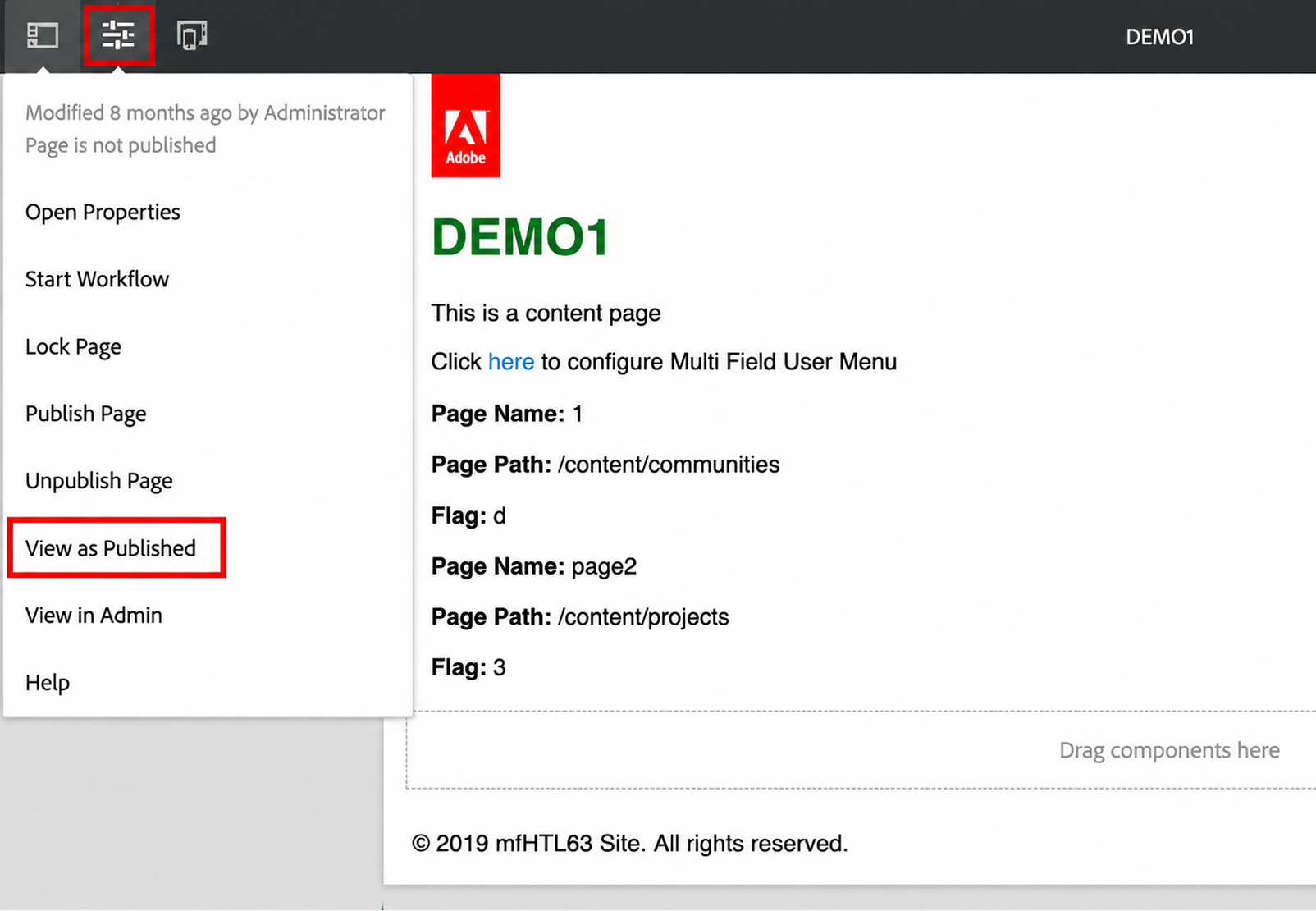
- Your implementation is a stable, page-centric AEM Sites experience with no near-term move to Edge Delivery Services or decoupled delivery.
- Your organization has substantial investment in templates, components, integrations and workflows that continue to meet business needs.
- Authors are productive with the existing drag-and-drop workflow and are not constrained by the current authoring experience.
- Content is primarily designed for an AEM-rendered website rather than reuse across multiple experiences.
- The cost, risk and disruption of migration exceed the business value that Universal Editor would currently provide.
Remaining on Page Editor should not be treated as avoiding modernization. If the existing model continues to meet author, customer and operational needs, retaining it may be the most commercially responsible decision. The important question is whether that choice still supports the organization’s roadmap, not whether it follows the newest tool direction immediately.
When Universal Editor Deserves Consideration
Universal Editor deserves serious consideration when:
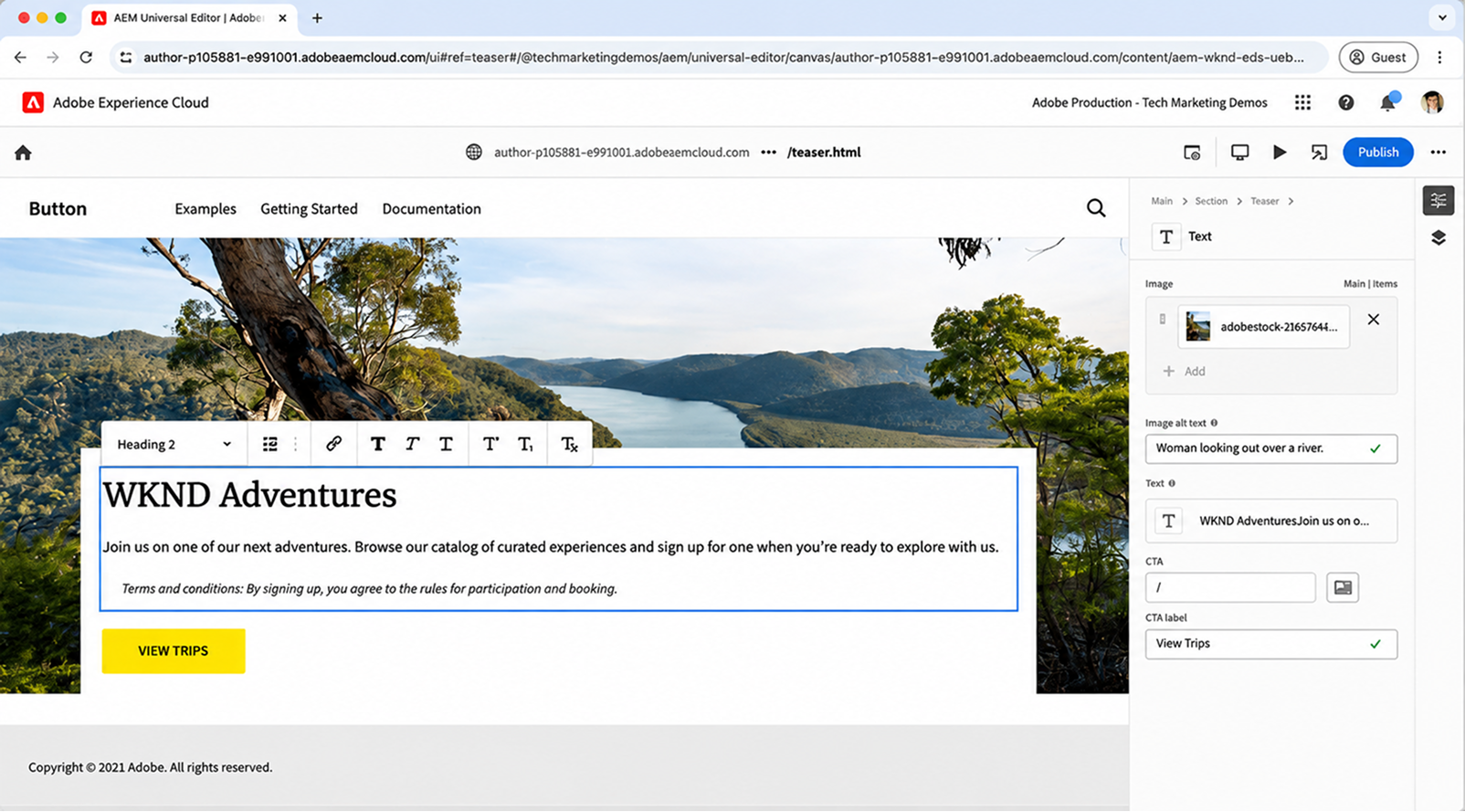
- You are adopting Edge Delivery Services.
- Your architecture is already decoupled or headless, or is actively moving in that direction.
- Authors need visual, in-context control over an experience rendered outside the traditional AEM page model.
- Content needs to be reused across websites, applications or other delivery channels.
- The experience assembles content from AEM and other properly integrated sources.
- You are building a new experience and can design its content model, components and authoring approach around Universal Editor from the beginning.
- Universal Editor is part of a broader modernization program with defined business outcomes, technical ownership and operational support.
The strongest case is not simply that Universal Editor is newer. It is that the current authoring model no longer fits the way content is structured, rendered or distributed.
When a Hybrid Model Makes Sense
Adobe documents Page Editor, Universal Editor, document-based authoring and Content Fragment Editor as authoring methods that can be used independently or in combination, depending on project needs.
A hybrid approach may be appropriate when different sites, brands, applications or content types have genuinely different requirements. For example, an organization could retain Page Editor for a mature corporate website while using Universal Editor for a new product experience built with Edge Delivery Services or a decoupled front end.
However, a hybrid model introduces additional operational complexity. Teams may need to support different authoring workflows, training materials, component models, governance rules and technical capabilities. The model should therefore be adopted intentionally, with clear boundaries defining which editor applies to each experience and why.
Before Choosing an AEM Authoring Model, Assess Your Readiness
Choosing an editor is bigger than comparing feature lists. It is a decision about content architecture, author operations, technical compatibility, existing AEM investment and the direction of the modernization roadmap.
Use the following questions to assess readiness:
- Are we using or planning to use Edge Delivery Services, decoupled rendering or headless delivery within the next 12–18 months?
- Which AEM version and hosting model are we running, and what Universal Editor capabilities and setup requirements apply to it?
- Which templates, components, integrations and workflows exist today, and which would need to be retained, adapted or rebuilt?
- How do authors currently work, and what specific problems would a different editing model solve?
- Is our content designed for individual pages, or does it need to be structured and reused across experiences?
- Which systems supply content, and how will Universal Editor identify, access and persist changes to each source?
- Which approval, permission, localization, translation and compliance processes are non-negotiable?
- Does our development team have the skills to instrument, test and support the target architecture?
- What networking, authentication, account and security requirements must be addressed?
- How will preview, publishing, versioning and rollback work in the new model?
- What representative pilot can test both technical compatibility and the author's experience?
- How will success be measured, for example, through reduced authoring time, fewer publishing errors, faster launches or lower developer dependency?
- What is the rollout, training and support plan if the authoring experience changes?
- What is the total cost of adoption, including content remodelling, component work, testing, governance and change management?
The right decision may be to retain Page Editor, introduce Universal Editor for a specific new experience or phase adoption across the estate. What matters is that the choice is supported by technical validation, author feedback, operational readiness and measurable business value.
If you are weighing this decision, an architecture and authoring-readiness assessment is usually the right first step, before a proof of concept, migration plan or implementation.
Xerago helps AEM teams assess readiness, validate technical compatibility, prototype the author experience and plan a phased rollout based on the realities of their existing estate.
Frequently Asked Questions
Does Universal Editor require Edge Delivery Services?
No. It works with Edge Delivery Services, headless setups using content fragments, or other decoupled front ends, as long as there is a supported connection through the Universal Editor Service.
Can Universal Editor and Page Editor run on the same AEM instance?
Yes. Many organizations run both, using Page Editor for existing page-based sites and Universal Editor for decoupled or structured applications.
Does switching to Universal Editor mean losing features like Multi Site Manager or translation workflows?
Not necessarily, but this should be confirmed for your specific architecture during technical validation.
Is the move to Universal Editor a large development effort?
It depends on your starting point. A traditional AEM site typically needs more instrumentation work than an application already built for structured content.
Should every new AEM project default to Universal Editor?
No. The right choice still depends on architecture, content sources, and delivery channels as the same factors covered in the comparison framework above.
Kaviarasu S
Associate Content Writer
Xtelligence Inbox.
Your weekly dose of marketing smarts!
Related Posts