---blog Title---
Cloud Costs Out of Control? 8 Strategies to Optimize and Save
---desktop---

---mobile---

The cloud has revolutionized the way businesses operate, offering scalability, flexibility, and on-demand computing power. However, as companies increasingly migrate workloads to the cloud, many find themselves grappling with rising cloud costs and inefficiencies. Unused resources, over-provisioned infrastructure, and complex pricing models can lead to unexpected expenses, eroding the cost benefits of cloud adoption.
A key factor contributing to this challenge is the "pay-as-you-go" pricing model. While it promises cost efficiency by charging only for what you use, many organizations misinterpret it as a guarantee of lower expenses. In reality, without proper monitoring and optimization, cloud costs can quickly spiral out of control due to idle resources, inefficient configurations, and untracked consumption.
Common Misconceptions about "Pay-as-you-go" Cloud Pricing Model
The term "Pay-as-you-go" in cloud computing is often misunderstood. Many assume it means paying strictly for the time or resources actively used. However, cloud billing models may include additional costs such as storage, data transfer, and reserved resources, which can lead to unexpected charges. Here's a breakdown
- In reality, while "Pay-as-you-go" does offer flexibility and scalability, it doesn't mean users are only charged for the precise minutes or seconds their applications are active. Instead, users are charged based on the resources they provision and reserve, not just the actual usage.
- Cloud pricing models are often complex, with costs influenced by factors like data transfer, storage type, network traffic, and more. Users might not be aware of these intricacies and could be surprised by unexpected charges.
---outlined-cta--- ["Pay-as-you-go" in cloud computing indeed offers flexibility and cost-efficiency, allowing users to scale resources up or down based on their needs. However, the misconception arises when users assume they'll only pay for actual usage, akin to utilities like electricity.]
- Leaving resources running (even if the applications aren't actively processing data) incurs costs. For instance, a virtual machine left running continuously will continue to accrue charges, even if the application it hosts isn't in use.
- While cloud services do offer auto-scaling, meaning they can automatically adjust resources based on demand, this can lead to higher costs during peak usage if not managed carefully. The scaling up of resources incurs additional charges.
- Cloud providers often charge for data transfers between different services or regions. This cost can be significant, especially for applications with high data transfer needs.
- Storing data in the cloud also incurs costs, and these costs can vary based on the type of storage used (e.g., standard vs. archival storage).
---outlined-cta---
Strategic Guide To Optimize Cloud Applications
Hidden Costs That Drive Up Cloud Spending
Hidden costs in cloud computing can catch users off guard if they are not carefully considered. These costs are not always immediately apparent when setting up cloud services but can accumulate over time. Here are some factors contributing to hidden costs:
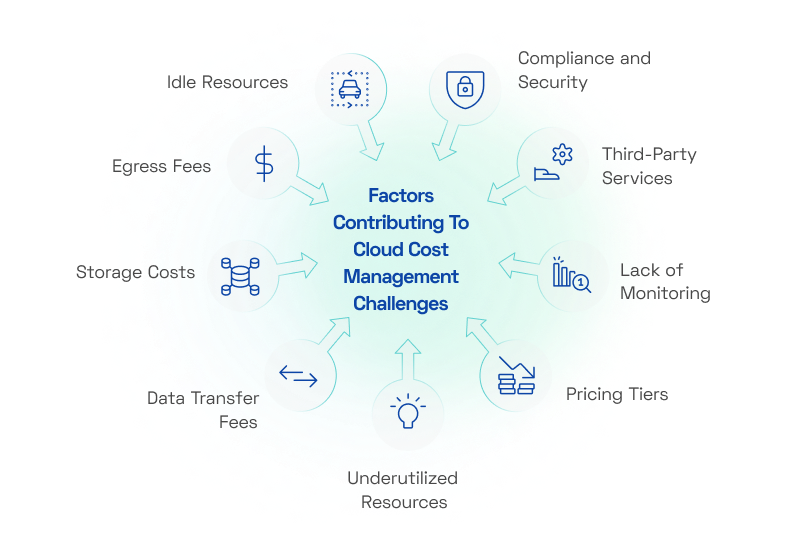
1. Data Transfer Fees:
- Transferring data between different regions within the cloud provider's network or between different cloud services can incur charges.
- Traffic going out of the cloud network to the internet can also result in additional fees.
2. Storage Costs:
- Different types of storage have varying costs, such as standard storage, archival storage, and storage with different redundancy levels.
- Often, users may not consider the amount of data they are storing or how long they will keep it, leading to unexpected charges.
3. Egress Fees:
- Similar to data transfer fees, egress fees are charged when data leaves the cloud provider's network.
- Users might not anticipate the impact of users or applications accessing data from outside the cloud network.
4. Idle Resources:
- Leaving virtual machines, databases, or other resources running when they are not actively being used can rack up costs.
- Many cloud services charge for the time these resources are provisioned, regardless of actual usage.
5. Underutilized Resources:
- Even if resources are not idle, they might be underutilized, meaning they are not fully maximizing the allocated capacity.
- Users may be paying for resources that could be downsized or consolidated without impacting performance.
6. Pricing Tiers and Add-ons:
- Cloud providers often offer various service tiers with different features and performance levels.
- Users might find themselves needing features that are only available in higher-priced tiers, resulting in unexpected costs.
7. Lack of Cost Monitoring:
- Without proper monitoring and management tools, users might not have visibility into their usage and costs.
- This lack of oversight can lead to surprises when the bill arrives at the end of the billing cycle.
8. Third-Party Services and Integrations:
- Cloud environments often rely on third-party services and integrations for additional functionalities.
- Users may overlook the costs associated with these services, which are typically billed separately from the core cloud services.
9. Compliance and Security:
- Meeting compliance requirements and implementing robust security measures often involve additional costs.
- Users may need to invest in specialized tools, audits, or consulting services to ensure data protection and regulatory compliance.
To prevent cost overruns, businesses need a cloud cost optimization strategy that ensures efficient resource utilization and cost control. This includes identifying idle and underutilized resources for rightsizing, implementing auto-scaling with cost thresholds to prevent unnecessary scaling, and optimizing data transfer strategies to minimize egress fees
What is Cloud Cost Optimization?
Cloud cost optimization is the practice of strategically managing cloud resources to minimize costs without compromising performance or scalability. It involves analyzing usage patterns, eliminating idle or underutilized resources, and selecting cost-effective pricing models to ensure maximum efficiency.
By leveraging techniques such as rightsizing, auto-scaling, reserved instances, and storage tiering, businesses can prevent overspending while maintaining operational agility. Cloud cost optimization is essential for ensuring that cloud investments align with business needs, delivering both financial and operational efficiency.
8 Effective Cloud Cost Optimization Strategies
Optimizing cloud costs is essential for businesses and organizations to ensure they are getting the most value out of their cloud investments. Here are some strategies to help optimize cloud costs:
1. Rightsize Resources:
Rightsizing is the process of adjusting cloud resources such as compute instances, databases, and storage to match actual workload requirements. It ensures that businesses are not overpaying for unused capacity or suffering from performance issues due to under-provisioned resources.
- Use cloud monitoring tools to track CPU, memory, and storage utilization over time.
- Analyze your resource usage regularly to identify over-provisioned or underutilized resources.
- Downsize or terminate instances that are not actively used or do not require high performance.
- Use instance size and type that match the workload requirements, rather than always choosing the largest options.
Implementing a rightsizing strategy is crucial for cost reduction, as it eliminates wasteful spending on unused capacity. It also enhances performance optimization by ensuring workloads receive the appropriate amount of resources without overloading or underutilizing them.
2. Implement Auto-Scaling:
Auto-scaling is a cloud optimization technique that automatically adjusts computing resources based on real-time demand. It ensures that applications have enough resources to handle peak loads while scaling down during low-traffic periods, preventing unnecessary costs.
- Configure auto-scaling rules to automatically adjust resources based on workload demand.
- This ensures you have enough resources to handle peak loads while scaling down during periods of low activity.
- When demand decreases, unused instances are terminated or scaled down, ensuring cost savings.
- Horizontal scaling adds or removes instances, while vertical scaling adjusts the size of existing instances to match demand.
- Auto-scaling can prevent over-provisioning and reduce idle resource costs.
By automating resource allocation, businesses benefit from cost efficiency, as they only pay for the resources they need at any given time. It also enhances performance and availability, ensuring that applications remain responsive during sudden traffic spikes while preventing unnecessary spending during idle times
3. Use Spot Instances or Preemptible VMs:
Spot instances (AWS) and preemptible VMs (Google Cloud) are temporary, low-cost cloud computing resources offered at significantly lower prices compared to standard on-demand instances. These resources take advantage of unused cloud capacity and are available at a fraction of the cost.
- Users request spot instances or preemptible VMs at a lower price compared to on-demand instances. Availability depends on supply and demand, and prices fluctuate accordingly.
- Since these instances can be terminated with little notice (AWS provides a two-minute warning, while Google Cloud allows a maximum of 24-hour usage), they are best suited for workloads that can tolerate disruptions.
- Spot instances work well for batch processing, big data analytics, CI/CD pipelines, machine learning training, and other distributed workloads that can be paused and resumed without major impact.
- Many organizations use a mix of spot instances for cost savings while relying on on-demand instances for critical workloads that require stability.
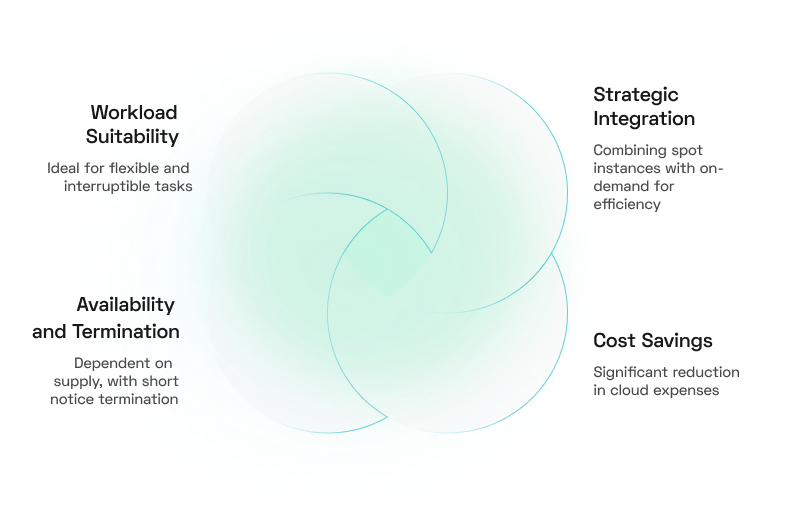
By strategically integrating spot instances or preemptible VMs into their cloud strategy, businesses can reduce cloud costs by up to 90% while maintaining flexibility and scalability for non-critical computing tasks.
4. Optimize Storage:
Storage optimization involves managing cloud storage effectively to reduce costs while ensuring data availability and performance. Cloud providers offer various storage options, such as standard, infrequent access, and archival storage, each with different pricing structures.
- Regularly assess storage consumption to identify frequently accessed (hot) data versus rarely used (cold) data. Use analytics tools provided by cloud providers (e.g., AWS Cost Explorer, Azure Monitor) to gain insights into storage patterns and make informed decisions
- Take advantage of cloud providers' storage classes (e.g., AWS S3 Standard, S3 Infrequent Access, and S3 Glacier) to store data in cost-effective locations based on access frequency. Frequently used data should stay in high-performance storage, while long-term, rarely accessed data can be moved to cheaper archival storage.
- Automate data movement between storage tiers based on access patterns. Configure policies to transition old files from standard storage to lower-cost archival storage or automatically delete temporary files after a set period.
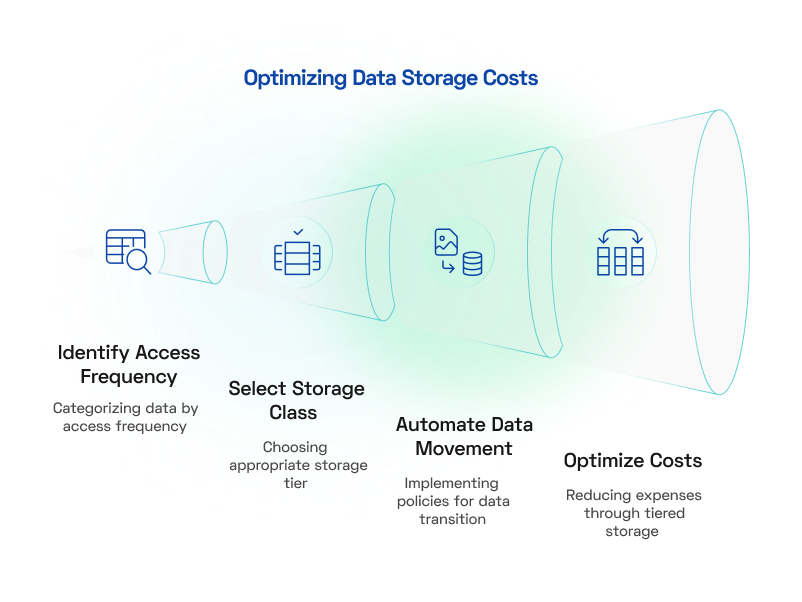
- Regularly clean up obsolete, duplicate, or unnecessary files that no longer serve a purpose. Implement data retention policies to ensure that old logs, backups, and unused snapshots are not taking up space and adding to costs.
Many organizations unknowingly pay for inactive data sitting in expensive storage tiers or incur unexpected data transfer charges. By optimizing storage, companies can significantly lower their cloud bills while ensuring that important data remains accessible when needed.
5. Monitor and Analyze Costs:
Cloud cost monitoring involves continuously tracking cloud resource usage, spending patterns, and billing trends to ensure cost efficiency. By leveraging cloud-native or third-party cost management tools, businesses can gain real-time insights into their cloud expenditures.
- Major cloud providers like AWS, Azure, and Google Cloud offer built-in cost tracking tools (e.g., AWS Cost Explorer, Azure Cost Management, Google Cloud Billing Reports) that provide visibility into usage and spending
- Advanced cost monitoring platforms like CloudHealth, Spot.io, and Apptio Cloudability provide deeper analytics, automation, and recommendations for optimizing cloud spending.
- Configure cost thresholds and real-time alerts to notify teams when spending exceeds a predefined limit. This proactive approach helps prevent cost overruns before they become significant.
- Regularly review cost reports to understand where money is being spent, identify unused or underutilized resources, and spot opportunities for optimization. Compare spending across different periods to track changes and detect anomalies.
By implementing proactive monitoring, companies can prevent budget overruns, improve cost predictability, and ensure that cloud spending aligns with business objectives.
6. Use Reserved Instances or Savings Plans:
Cloud providers offer cost-saving options like Reserved Instances (RIs) and Savings Plans, which allow businesses to commit to a specific level of cloud usage for a discounted rate compared to on-demand pricing. These options are ideal for predictable workloads that require long-term cloud resources.
- AWS Reserved Instances, Azure Reserved VM Instances, and Google Committed Use Contracts provide savings of up to 75% for long-term commitments (1 or 3 years).
- Consider convertible reserved instances, which allow businesses to change instance types if workload requirements evolve.
- Use compute savings plans to optimize costs across different instance families and regions.
- Combine on-demand and reserved instances to balance flexibility and cost efficiency.
By adopting RIs or Savings Plans, organizations gain better budget predictability, reduced cloud expenses, and optimized resource allocation, ensuring they do not overspend on underutilized or fluctuating workloads.
7. Optimize Data Transfer Costs:
Data transfer costs are often an overlooked aspect of cloud spending but can quickly add up, especially for businesses with high network traffic. These costs arise when data moves between cloud regions, across different cloud services, or from the cloud to the internet (egress fees).
- Keep workloads within the same cloud region whenever possible to avoid additional cross-region data transfer fees.
- Use CDNs like CloudFront, Azure CDN, or Cloudflare to cache frequently accessed content closer to end users, reducing egress costs.
- Analyze and adjust traffic flow to prevent unnecessary data movement across expensive cloud pathways.
- Services like AWS Direct Connect, Azure ExpressRoute, or Google Cloud Interconnect provide cost-effective, high-bandwidth data transfer compared to the public internet.
8. Evaluate and Optimize Architectures:
Evaluating and optimizing cloud architectures means reviewing your existing cloud infrastructure to enhance efficiency, reduce costs, and improve performance. It involves assessing computing resources, storage, networking, and services to ensure they align with business goals.
- Conduct regular audits to identify inefficiencies and improvement areas. Use tools like AWS Well-Architected Framework or Azure Advisor.
- Use services like AWS Lambda, Azure Functions, or Google Cloud Functions to run event-driven applications without managing servers.
- Shift workloads to managed databases, AI/ML services, and Platform-as-a-Service (PaaS) options to minimize operational overhead.
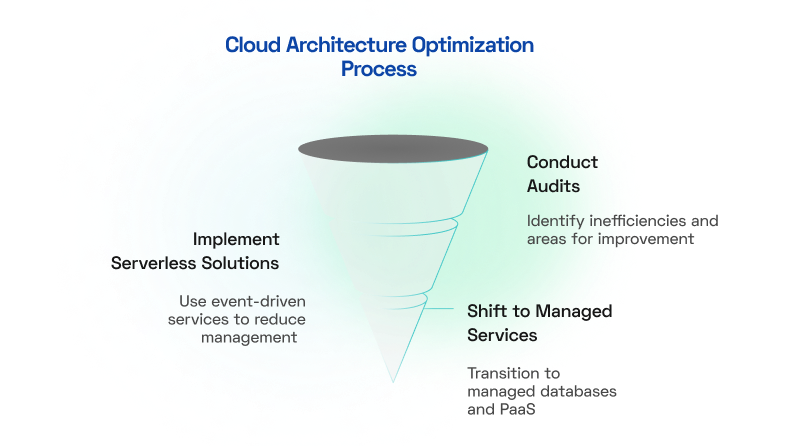
Regularly reviewing cloud architecture ensures that resources are right-sized and aligned with business needs, preventing waste while improving efficiency.
How Cloud Cost Management Tools Help Reduce Unnecessary Spending
Cloud cost management tools and dashboards are essential for organizations to gain visibility into their cloud spending, track expenses, and analyze usage patterns. These tools provide insights that help in optimizing costs, identifying cost-saving opportunities, and making informed decisions about resource allocation.
Several popular cloud cost management tools help organizations track, analyze, and optimize their cloud spending. AWS Cost Explorer provides detailed insights into AWS spending patterns and forecasts future costs, while Azure Cost Management + Billing enables Azure users to track usage, set budgets, and analyze cost trends. Google Cloud Billing Reports offers visibility into cloud expenditures with cost allocation and forecasting features.
Here's how they assist in tracking and analyzing expenses:
- Real-time Cost Tracking – Gain instant visibility into cloud spending to detect and prevent budget overruns before they happen.
- Detailed Cost Reports – Analyze expenses with breakdowns by service, region, instance type, or custom tags to identify spending patterns.
- Budgeting & Forecasting – Set budget thresholds with alerts and predict future costs based on historical usage and planned projects.
- Optimization Suggestions – Receive AI-driven recommendations on resizing instances, using reserved or spot instances, and optimizing storage to reduce costs.
- Visual Dashboards – Leverage interactive charts and graphs to easily track spending trends, cost distribution, and key cost drivers.
- Cloud Provider Integration – Seamlessly connect with AWS, Azure, and Google Cloud for real-time billing and usage insights without manual data entry.
- Scalable & Customizable – Adapt dashboards, reports, and alerts to match organizational needs while scaling with cloud usage growth.
---insight-section---
Conclusion
To maximize the benefits of cloud computing while keeping costs under control, businesses must take a proactive approach to cloud cost optimization. By rightsizing resources, leveraging auto-scaling, using cost-effective instance types, optimizing storage, and continuously monitoring expenses, organizations can strike a balance between performance and cost efficiency. A well-implemented cloud cost optimization strategy not only prevents unnecessary spending but also ensures that cloud investments align with business objectives, enabling long-term scalability and operational agility.
---outlined-cta---
Looking for cloud consulting services? We help you assess, strategize, and implement cloud solutions for scalability and efficiency.
---Interests---
You may also be interested in

Thought Leadership
Are Predictive Models Still Relevant in the Age of Campaigns, Journeys, and Nudges?

POV
Tracking Metrics in Adobe Analytics: A Strategic Guide

Thought Leadership
Digital Analytics Audit: Steps to Perform a Digital Analytics Audit for Business Growth