Interactions Correctly?


A Complete Strategy Guide to Salesforce CRM Implementation


Salesforce CRM Implementation - Effective Strategies & Challenges
You might know the frustration of trying to manage customer data scattered across spreadsheets, emails, and multiple tools. It’s inefficient, chaotic, and often leads to missed opportunities.
Without a Customer Relationship Management system, staying on top of follow-ups, customer preferences, and team collaboration becomes a daily struggle.
- Your sales team might lose track of important leads, resulting in delayed responses or lost deals.
- Your marketing efforts could feel disconnected, making it harder to engage customers with personalized campaigns.
- And a lot other complications
And when 66% of customers expect businesses to understand their unique needs, falling short can mean losing their trust—and their business.
Salesforce is a world leader in Customer Relationship Management (CRM) solutions, with over 23% of the global market share. Trusted by companies like Amazon, Coca-Cola, American Express, and Spotify, Salesforce helps businesses grow and succeed across industries.
But to fully benefit from Salesforce CRM, you need a clear plan for implementation, along with best practices and step-by-step guidance.
In this guide, we’ll explore the benefits of Salesforce CRM, its types, common challenges during implementation, and actionable strategies for success. By the end, you’ll have the insights needed to make your Salesforce CRM implementation journey smooth and effective.
Types of Salesforce CRM
Salesforce CRM is designed to help businesses manage relationships with current and potential customers. It offers tools to automate sales, improve marketing efforts, and enhance customer service—all within a single, scalable platform.
As part of your Salesforce CRM implementation, understanding the type of CRM you need is essential. Salesforce supports three major CRM models:
- Operational CRM: Automates sales, marketing, and service processes like lead management and case tracking.
- Analytical CRM: Offers data-driven insights through advanced reporting and customer analytics to improve decision-making.
- Collaborative CRM: Facilitates seamless communication and information sharing across departments such as sales, marketing, and customer support.
Together, these Salesforce CRM solutions empower teams to manage customer data more efficiently and implement personalized experiences. Businesses looking for unified data intelligence may also consider a Salesforce customer data platform implementation for next-level engagement.
Salesforce CRM Implementation: Strategies and Best Practices
Implementing Salesforce CRM can feel like a big task, but with the right strategies, it becomes manageable and even exciting. Here’s a detailed and straightforward strategy guide on Salesforce implementation.
1. Setting Objectives: Your Strategy Should Meet Action
Start by understanding your current processes and identifying what you want to improve with Salesforce. Think about areas like customer relationships, efficiency, or better data management. Be specific about what you want to achieve and write down clear objectives. This will guide the entire process.
Best Practice: Develop a roadmap with measurable milestones to track progress.
2. Smart Finance Your Salesforce CRM Implementation
Plan your finances carefully. A proper budget helps you avoid unexpected costs and keeps everything on track. Your budget should include:
- Software Licenses: The cost of using Salesforce.
- Customization: Adapting the platform to fit your needs.
- Integration Costs: Connecting Salesforce to your existing systems.
- Training and Support: Ensuring your team knows how to use it well.
- Maintenance: Ongoing updates and fixes.
Best Practices:
- Estimate Costs: Include all components such as licensing, customization, training, and support.
- Allocate Contingency Funds: Set aside 10-15% of the budget for unexpected expenses.
- Review with Stakeholders: Ensure alignment with organizational goals and financial constraints.
- Monitor Spending: Track expenses during implementation to avoid overspending.

Further Recommendations on Financial Planning:
- Start with a pilot project to minimize upfront costs and validate processes.
- Opt for scalable solutions to accommodate future growth.
- Evaluate ROI periodically to justify ongoing investments.
3. Choose the Right Salesforce Edition
Salesforce offers different versions, like Essentials, Professional, Enterprise, and Unlimited. Pick the one that matches your business size and needs.
- Essentials: Tailored for small businesses needing basic CRM functionalities like contact and opportunity management.
- Professional: Suitable for growing businesses requiring more advanced sales and marketing tools, including lead scoring and campaign management.
- Enterprise: Designed for larger organizations with complex sales processes, offering extensive customization, workflow automation, and integration capabilities.
- Unlimited: Provides all Enterprise features plus unlimited customization, premium support, and additional sandboxes for development and testing.
Review the pricing structure of each edition to ensure it aligns with your budget constraints. You can enhance your chosen edition's capabilities by integrating add-ons from the Salesforce AppExchange. This marketplace offers a plethora of applications to extend functionality in areas like marketing automation, data analytics, and customer support.
Pro tip: You can also take advantage of free trials offered by Salesforce to explore different editions. This hands-on experience can provide clarity on which edition best suits your operational workflows.
4. Find the Right Salesforce Implementation Partners If Required
You’ll need skilled people to help with this process. Whether they’re Salesforce consultants, implementation partners, or in-house experts, make sure they understand your industry and can provide the right support.
At Xerago, we bring over a decade of expertise in Salesforce Marketing Cloud services, ensuring a smooth and effective implementation tailored to your business needs.
With 70+ Salesforce experts, 60+ projects, and 30+ Salesforce certifications, we help enable personalized customer experiences, automate journeys, and deliver real-time, data-driven content. Get in touch with our experts to learn more.
Best Practice: Prioritize partners with a proven track record in your business domain.
5. Drive Team Alignment and Adoption with a Strong Change Management Strategy
Develop a comprehensive change management strategy to prepare your organization for adopting Salesforce CRM implementation services. This includes identifying stakeholders, communicating the benefits of the CRM system, addressing potential resistance, and outlining a timeline for implementation.
Best Practice: Develop a detailed change management strategy with timelines and stakeholder engagement plans.
6. Migrate Your CRM Data to Ensure Accuracy and Integrity for Better Decision-Making
Data quality is critical for a successful SalesforceCRM implementation. Moving your current data into Salesforce is a key step. Before transferring, CRM data cleansing should be performed by removing duplicates, fixing errors, and organizing it to ensure the data is accurate and ready for use.
This process is one of the most sensitive \\Salesforce implementation challenges—\\but also one of the most rewarding if done right. Clean data powers better decision-making and supports long-term CRM adoption
Strategies for a seamless data migration in Salesforce CRM:
1. Pre-Migration Planning
- Assess current data and define migration objectives.
- Involve key stakeholders to align goals.
2. Data Mapping
- Map fields between your existing system and Salesforce.
- Standardize data formats to ensure compatibility.
3. Data Cleansing
- Remove duplicates, fix errors, and normalize data.
- Use tools like Data Loader or DemandTools for cleaning.
4. Data Validation
- Set validation rules in Salesforce.
- Run a sample migration to spot issues early.
5. Data Migration
- Use tools like Salesforce Data Loader or Jitterbit for transfer.
- Migrate data in phases (e.g., accounts, contacts).
6. Post-Migration Testing
- Verify data accuracy and run user acceptance testing (UAT).
- Cross-check Salesforce data with the source system.
7. Data Backup
- Back up both pre- and post-migration data to prevent loss.
8. Ongoing Governance
- Regularly clean and audit data.
- Implement data governance policies to maintain accuracy.
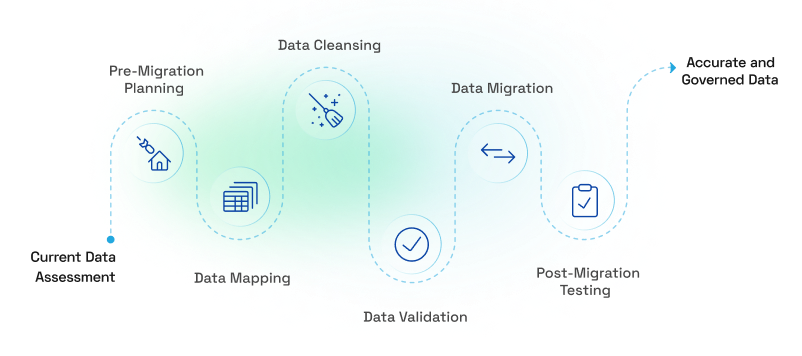
Best Practice: Use tools like Salesforce Data Loader, conduct extensive testing, and implement data governance policies to maintain data accuracy.
Xerago’s Salesforce Prowess in Action: How a Leading Automotive Manufacturer Transformed Customer Engagement with Salesforce Optimization
When a leading automotive manufacturer onboarded Xerago to optimize their Salesforce platform, they faced a daunting challenge: an underutilized system, inefficient engagement strategies, and disconnected Sales and Marketing Clouds.
- Despite having a strong presence in domestic and international markets with a diverse range of vehicles and services, their Salesforce platform was far from reaching its potential.
- The manufacturer struggled with inefficient workflows, missed customer engagement opportunities, and the inability to harness Salesforce’s full capabilities.
- Processes like payment tracking, customer communication, and data integration were manual and cumbersome, affecting both internal teams and customer satisfaction.
The Turning Point
Recognizing these roadblocks, Xerago formed a team of technology and marketing experts to tackle the issues head-on. The first step? A detailed environmental audit of the existing Salesforce setup. Xerago engaged closely with stakeholders from Sales, Marketing, and Customer Service to identify pain points and map out a customer-first strategy.
Xerago’s plan was comprehensive and impactful:
- Customizing Salesforce for Business Needs
The Sales Cloud was enhanced to enable precise payment tracking, a critical feature for sales teams and channel partners. All customizations were designed with minimal code changes to ensure quick implementation and scalability.
- Streamlining Customer Journeys
By analyzing interaction points, Xerago identified gaps in customer engagement and automated key journeys like “Book a Test Drive” and “Engage with Relevant Content.” Messaging was tailored to align with the brand’s tone, creating a consistent and impactful customer experience.
- Seamless Integrations
Salesforce was integrated with social media platforms to bridge communication gaps. The Sales and Marketing Clouds were also connected, enabling smooth lead and sales data transfer for controlled and effective campaigns.
- Empowering Teams with Automation
Manual processes were reduced significantly through automation. Campaigns and lifecycle communications were streamlined, allowing teams to focus on high-value tasks instead of routine operations.
We delivered impressive results:
- 37% improvement in brand engagement.
- 30% boost in customer satisfaction (CSAT) scores.
- 100% lifecycle communication automation.
- 40% reduction in manual effort.
With a fully optimized Salesforce platform, the automotive manufacturer turned a fragmented system into a powerful tool for enhancing customer engagement. Today, their teams operate more efficiently, their customers are more satisfied, and their brand resonates stronger than ever.
7. Streamline Operations by Integrating Salesforce CRM with Existing Tools
To make Salesforce even more powerful, connect it to the tools you already use. For example:
- ERP Systems: Streamline inventory management, order processing, and financial data.
- Marketing Automation Tools: Sync marketing campaigns and customer data for targeted engagement.
- Customer Support Systems: Integrate with helpdesk tools to provide comprehensive service management.
- Analytics Platforms: Enhance reporting and decision-making with advanced analytics tools like Tableau.
Best Practice: Map workflows between systems to ensure smooth data flow and operational consistency.
8. Boost Productivity with a Phased Roll-Out Approach
Implement Salesforce CRM in phases rather than all at once. Instead of launching everything at once, start with the basics, like managing contacts and tracking leads. Once your team is comfortable, add more advanced features.
Best Practice: Monitor each phase to address issues and gather feedback for future implementations.
9. Empower Business Growth with Tailored Salesforce Customizations
Customizing Salesforce to align with unique business needs can significantly enhance its effectiveness. Here are the steps and best practices for effective customization:
Here’s How You Can Customize Salesforce CRM:\*
- Understand Business Requirements: Conduct a thorough analysis of workflows, processes, and goals to identify specific customization needs.
- Use Standard Features First: Explore Salesforce’s built-in tools and features before implementing custom solutions.
- Design User-Friendly Interfaces: Create layouts, fields, and workflows that are intuitive and relevant to users.
- Develop Custom Objects and Fields: Extend functionality by creating custom objects and fields where necessary.
- Automate Workflows: Use tools like Process Builder and Flow to streamline repetitive tasks and improve efficiency.
- Test Customizations: Validate custom configurations in a sandbox environment to ensure they work as intended without disrupting existing processes.
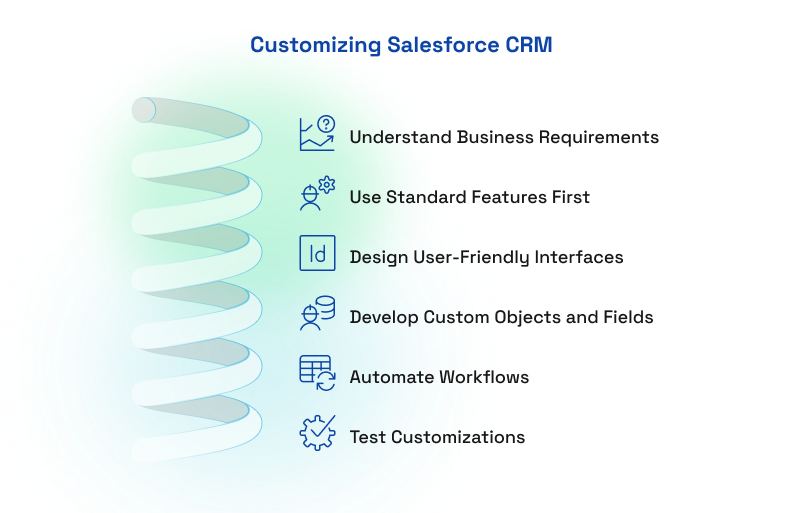
Best Practices:
- Involve End Users: Gather feedback from users to ensure customizations address their needs effectively.
- Avoid Over-Customization: Keep configurations simple to maintain system efficiency and reduce maintenance overhead.
- Document Changes: Maintain a record of customizations for future reference and troubleshooting.
- Plan for Scalability: Design customizations that can accommodate business growth and evolving needs.
10. Increase Employee Efficiency Through Comprehensive Training
Give your team the knowledge they need to use Salesforce confidently. Offer training sessions, workshops, and easy-to-follow guides. Make sure everyone knows how to use it in their day-to-day work.
11. Maintain Peak Performance with Reliable CRM Support and Maintenance
Establish protocols for ongoing CRM maintenance, updates, and technical support. Assign internal administrators or partner with Salesforce CRM implementation and support services to address user inquiries, troubleshoot issues, and optimize system performance.
12. Enhance Reliability and Performance Through Rigorous Testing
Enhancing reliability and performance in Salesforce CRM requires rigorous testing across configurations, integrations with third-party applications, and customizations. This involves validating workflows, ensuring data migration accuracy, and checking security settings and user permissions to address potential issues before deployment.
Rigorous testing:
- Ensures System Reliability: Rigorous testing validates that workflows, integrations, and data migrations are functioning correctly.
- Identifies Errors Early: Catch and address configuration or data issues before deployment.
- Optimizes Performance: Testing helps fine-tune the system to improve efficiency and usability.
A key best practice is incorporating User Acceptance Testing (UAT), which involves end-users in validating the system’s functionality against their requirements. This collaborative approach helps refine workflows and interfaces, enhances user experience, and builds confidence in the system’s reliability.
13. Safeguard Business Data with Robust Security Measures
Protecting business data is paramount, and robust security measures form the foundation of a secure Salesforce environment. Protecting your data is critical. Here’s where you can start:
- Configure role-based access and data-sharing settings to limit access to sensitive information.
- Enable multi-factor authentication (MFA) adds an extra layer of security, making unauthorized access more difficult.
- Regular updates to security settings ensure compliance with industry standards and address emerging threats. A proactive approach to security protects critical business data and reinforces trust among users and stakeholders.
14. Foster Long-Term Success with Continuous Post-Implementation Support
Fostering long-term success with Salesforce requires continuous post-implementation support to ensure user satisfaction and system efficiency. You can do this by:
- Establishing a dedicated helpdesk team allows prompt resolution of user issues and system queries, ensuring minimal disruption to business operations.
- Regularly collecting user feedback helps identify pain points and areas for improvement, enabling a more user-centric approach to system refinement.
- Continuous optimization of system performance ensures Salesforce evolves alongside business needs, while scheduled maintenance and timely updates keep the platform secure and aligned with the latest features.
Major Challenges in Salesforce CRM Implementation
Companies face a lot of challenges when they decide to implement any new platforms. And Salesforce CRM implementation isn’t an exception. Let’s look at the major challengers faced by them:
Data Migration Issues
Moving data from your old systems to Salesforce CRM isn’t always smooth. Different data formats, structures, and issues with data quality can create roadblocks.
If not handled carefully, you risk losing or corrupting data during the transfer. This can cause gaps and inaccuracies that disrupt your business processes and make users doubt the reliability of the new system.
Customization Complexities
Every business is unique, and customizing Salesforce CRM to meet your specific needs is a big task. You’ll need to set up fields, workflows, and automation to match your processes.
But if the customizations get too complex, it can make the system harder to use, slow down its performance, and create headaches when updates or maintenance are needed. Balancing customization with usability is key when implementing Salesforce at scale.
Resistance to Change
Change can be hard, and introducing Salesforce CRM to your team might not always go as planned. People may be attached to the tools they’re used to or worried about how this new system will affect their work.
Without addressing these concerns, resistance can slow down adoption, impact productivity, and prevent you from making the most of Salesforce CRM.
Integration Challenges
Salesforce CRM doesn’t exist in a vacuum—it needs to work well with your other systems, like ERP software, marketing automation tools, or older legacy systems. But integrating these systems isn’t always easy.
Differences in how they store and share data can lead to silos, mismatched information, and inefficient processes. Poor integration undermines the full value of your Salesforce CRM solution, making seamless connections a critical part of how to implement Salesforce successfully.
Scalability and Future-proofing
As your business grows, so will your data and processes. Salesforce CRM needs to scale with you, but if it isn’t set up to handle growth, it can cause performance issues and higher costs for maintenance.
You may even have to redo parts of the system to keep up with your future needs, which can be time-consuming and expensive. A well-planned Salesforce implementation strategy accounts for scalability from the start.
User Training and Adoption
Even the best system won’t deliver results if your team isn’t trained to use it. It’s essential to provide thorough training so that employees understand how to use Salesforce CRM effectively in their day-to-day work.
Without this, adoption rates will stay low, and your team may miss out on ways to improve processes and drive better results. Addressing training as part of your SalesforceCRM implementation is key to long-term success.
Top 9 Benefits of Having Salesforce CRM
1. Understand Your Customers Like Never Before
Salesforce CRM gives you a unified view of customer data from various touchpoints. This includes their past purchases, preferences, interactions, and even support requests.
With everything centralized, you’ll gain a clear understanding of what your customers need and expect. This insight helps you create personalized marketing, improve your service, and build stronger relationships that keep customers coming back—making your SalesforceCRM implementation more impactful.
2. Save Time with Automation
Tired of wasting time on repetitive tasks? Salesforce CRM automates those for you—things like entering data, nurturing leads, and following up with customers. Its automation tools, like workflows and process builders, make it easy to streamline your work.
With less time spent on routine tasks, you and your team can focus on the big-picture strategies that drive growth and innovation.
3. Make Better Decisions with Analytics
Salesforce comes with powerful analytics that let you create dashboards and reports tailored to your needs. You can track key numbers like sales performance, marketing success, and customer trends—all in real time.
These data-driven actionable insights help you make smarter decisions, find ways to improve your business, and spot new opportunities for growth.
4. Grow Without Limits
No matter the size of your business—whether you're just starting out or already running a large enterprise—Salesforce CRM grows with you. It’s designed to handle increasing amounts of data, users, and tools as your business expands.
Plus, it’s highly customizable and works with other systems, making it flexible enough to adapt to your unique needs.
5. Bring Teams Together
Salesforce isn’t just a CRM; it’s a platform that helps your teams work better together. Features like Chatter let your employees communicate in real-time, while built-in tools ensure everyone stays on the same page.
By connecting sales, marketing, customer support, and other departments, you’ll create a collaborative environment where everyone is aligned and working efficiently.
6. Deliver Outstanding Customer Support
With Salesforce’s Service Cloud, you can provide top-notch customer service. It allows you to handle customer inquiries quickly, integrate helpful knowledge bases, and support customers across multiple channels.
This means you can solve problems faster, offer proactive help, and ensure your customers feel valued and satisfied—building trust and loyalty in the process.
7. Run Smarter Marketing Campaigns
Salesforce integrates seamlessly with Marketing Cloud to help you automate your marketing efforts. You can create campaigns that target the right audience based on their behavior and preferences.
By tracking how these campaigns perform, you’ll know exactly what’s working and where to improve, so you can deliver personalized experiences, drive better results and boost sales.
8. Stay Connected Anywhere
Whether you’re in the office, on the road, or working remotely, Salesforce’s mobile app makes it easy to access your CRM data wherever you are. You can check updates, share information, and respond to customer needs in real-time—all from your phone or tablet. This keeps you connected, productive, and ready to serve customers no matter where you are.
9. Always Have the Latest Technology
Salesforce is constantly improving its platform with regular updates and new features. From cutting-edge tools like artificial intelligence and predictive analytics to enhanced user experiences, Salesforce ensures you stay ahead of the curve.
This means you’ll always have the tools you need to adapt to changes, stay competitive, and meet your customers’ evolving expectations.
Do You Need a Salesforce Implementation Partner?
Deciding whether to engage a Salesforce implementation partner depends on your organization's unique requirements, expertise, and resources. While some businesses may choose to implement Salesforce internally, partnering with an expert often proves more efficient and beneficial for long-term success.
Nevertheless, collaborating with a Salesforce implementation partner offers several advantages:
- Expertise and Experience: Partners bring in-depth knowledge, ensuring best practices are followed.
- Customized Solutions: Tailored configurations address specific business needs.
- Accelerated Deployment: Specialized teams expedite the implementation process.
- Risk Mitigation: Partners anticipate and address potential challenges proactively.
- Skill Transfer: Effective partners emphasize knowledge-sharing, empowering businesses to maintain and expand systems independently.
Here is a comparison of Salesforce implementation approaches
| Approach | Pros | Cons | Best For |
|---|---|---|---|
| Self-Managed | Cost savings, skill development | High risk, requires expertise | Small businesses, simple needs |
| Managed by a Partner | Expert guidance, fast deployment | Higher cost, potential dependency | Large enterprises, complex needs |
| Hybrid Model | Balanced control, cost-effective | Coordination challenges | Medium to large businesses |
How Top Brands Successfully Implemented Salesforce and Earned a Competitive Advantage
How Spotify Transformed Customer Engagement and Boosted Sales with Salesforce
Before adopting Salesforce, Spotify faced challenges in managing customer interactions, leading to fragmented communications and slower service response times. By integrating Salesforce Sales Cloud and Service Cloud, Spotify achieved:
- A 25% improvement in customer service efficiency
- A 30% reduction in response times to customer inquiries
- Increased overall sales by using AI-powered insights for lead management
Adidas: Personalized Campaigns Yielding Higher Engagement
Adidas was on a mission to make every customer feel like their favorite pair of sneakers—tailor-made just for them. But with countless sales channels, from physical stores to e-commerce platforms, their customer experience felt fragmented.
Enter Salesforce Marketing Cloud. Adidas used it to stitch together a seamless omnichannel experience, analyzing customer data to craft personalized campaigns. Inventory management became a breeze, engagement rates soared, and customers walked away delighted, whether online or in-store.
L’Oréal: Better ROI on Marketing Campaigns
For L’Oréal, every customer is unique, and they wanted their marketing to reflect that. But with operations spread across the globe, keeping their messaging consistent while personalizing experiences was a daunting task.
Salesforce CRM stepped in as their artist’s palette. By centralizing customer data, L’Oréal painted vibrant campaigns tailored to individual preferences. Marketing ROI climbed, brand messaging became seamless, and customer loyalty reached new heights. L’Oréal’s story became a masterpiece of data-driven decision-making.
Conclusion
Salesforce isn’t just software—it’s the secret weapon behind industry giants. Are you ready to join the 150,000+ businesses already transforming their operations with Salesforce? Explore how Salesforce can transform your operations, and set an urge to experience the journey towards improved efficiency and customer satisfaction.
Ashvini SK
Senior Content Writer
Xtelligence Inbox.
Your weekly dose of marketing smarts!